
exploiting xxe via image file upload
the lab#
here is how portswigger describes it
This lab lets users attach avatars to comments and uses the Apache Batik library to process avatar image files.
To solve the lab, upload an image that displays the contents of the /etc/hostname file after processing. Then use the "Submit solution" button to submit the value of the server hostname.
this follows the xinclude lab and rounds off the xxe series with a different way in entirely. we are not editing an api request or a stock check body this time, we are uploading an image, and the trick is that the image format the server accepts is secretly xml under the hood.
The idea#
xxe needs the server to parse xml we control. usually that xml is an obvious request body, but here it arrives as an avatar image. the format that lets us do this is svg, because an svg image is not a grid of pixels like a png, it is a text document written in xml that describes shapes and text to draw. so an svg file can carry a doctype and an external entity just like any other xml, and if whatever renders it has external entities switched on, uploading the image is enough to trigger the read. we point the entity at /etc/hostname and have the image draw that value as visible text, so the answer shows up painted right into the picture the server hands back.
what the Apache Batik library is?#
Apache Batik is a java library for working with svg images, the piece of software this app uses to take an uploaded avatar and turn it into a rendered picture. the important part for us is that rendering an svg means parsing xml, and Batik will resolve external entities while it does so unless it has been locked down. so it is Batik, sitting quietly behind the avatar feature, that reads our file for us when it processes the upload.
why an svg is xml#
the whole attack rests on this, so it is worth a moment. an svg is not a photo, it is a markup document. open one in a text editor and you find xml tags, <svg> at the root with <text>, <rect>, <circle> and so on inside, each describing something to draw. because it is genuine xml, everything xxe relies on is available to it, a doctype block, entity declarations, and entity references, all perfectly valid inside an svg. that is what makes an image upload a viable delivery method for an xxe payload, the image is a parser target dressed up as a picture.
Step 1 - Build the malicious svg#
we create a local svg file with this content.
echo '<?xml version="1.0" standalone="yes"?><!DOCTYPE test [ <!ENTITY xxe SYSTEM "file:///etc/hostname" > ]><svg width="128px" height="128px" xmlns="http://www.w3.org/2000/svg" xmlns:xlink="http://www.w3.org/1999/xlink" version="1.1"><text font-size="16" x="0" y="16">&xxe;</text></svg>' > payload.svg
pulling out the parts that matter, <!DOCTYPE test [ <!ENTITY xxe SYSTEM "file:///etc/hostname" > ]> is the same external entity declaration as the earlier file read labs, it defines an entity xxe whose value is the contents of /etc/hostname. the rest is an ordinary little svg, a canvas with a single <text> element, and the key is that its content is &xxe;. so when the image is rendered, the entity expands and the file's contents are drawn as the text of the image. everything else, the width, height, and namespaces, is just the boilerplate that makes it a valid svg.

Step 2 - Upload it as an avatar#
we post a comment on any blog post and upload the svg we just made as the avatar for that comment.
when the server accepts the avatar it hands it to Batik to render, and rendering it parses our xml, resolves &xxe;, and reads /etc/hostname into the text of the image.
Step 3 - Read the hostname off the rendered image#
we go back and view our comment, and the avatar now shows the contents of /etc/hostname as text drawn into the picture.

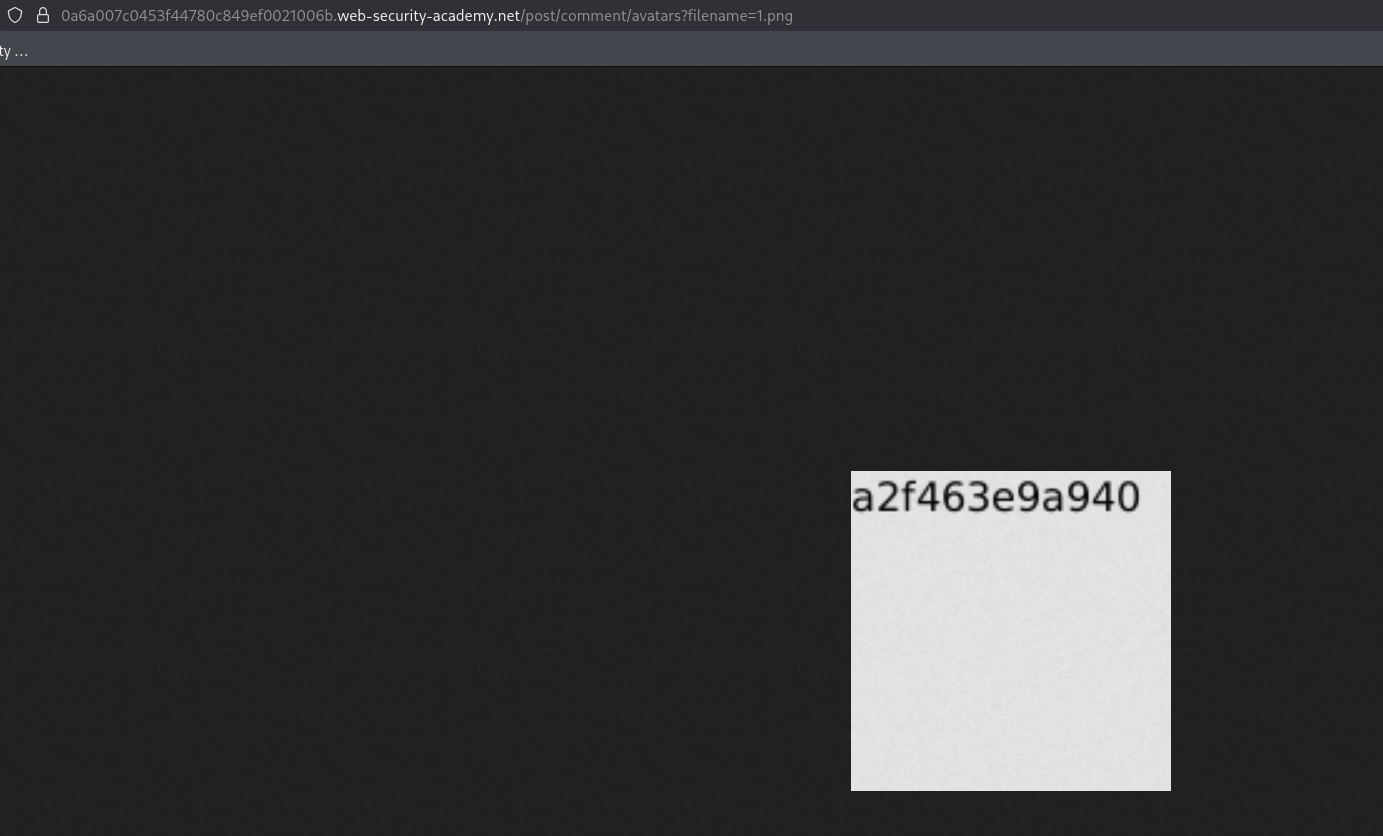
we read the hostname off the image and submit it

with this, we solved the lab!