
The lab
here is how portswigger describes it
This lab contains a DOM-clobbering vulnerability. The comment functionality allows "safe" HTML. To solve this lab, construct an HTML injection that clobbers a variable and uses XSS to call the alert() function.
the earlier dom labs let us inject script or steer a sink directly, but this one takes script away, the comments only allow "safe" html, so we cannot drop in a <script> or an event handler and have it survive. dom clobbering is the technique for that exact situation attacking a page with nothing but plain html
The idea#
dom clobbering leans on a legacy browser habit. when an html element has an id or a name, the browser quietly creates a javascript reference to it on the global scope, so <a id=x> makes window.x point to that element. that is usually harmless but it means anyone who can inject html even without any script can create or overwrite javascript variables that the page's own code goes on to read. if the page trusts one of those variables we can clobber it and bend the code to our will.
the trick that makes this lab work is a small extension of that. if you inject two elements that share the same id the browser groups them into a collection under that name and then you can reach a specific member of the collection by its name attribute. so two anchors with the same id give us an object and a name on one of them gives us a property on that object and the value of that property when the code turns it into a string is the anchor's href. that is enough to hand the page a string of our choosing through a variable it thought it owned.
Step 1 - Find the variable worth clobbering#
no login or search so we read the comment loading script, loadCommentsWithDomClobbering.js and the interesting lines are where it builds a comment's avatar
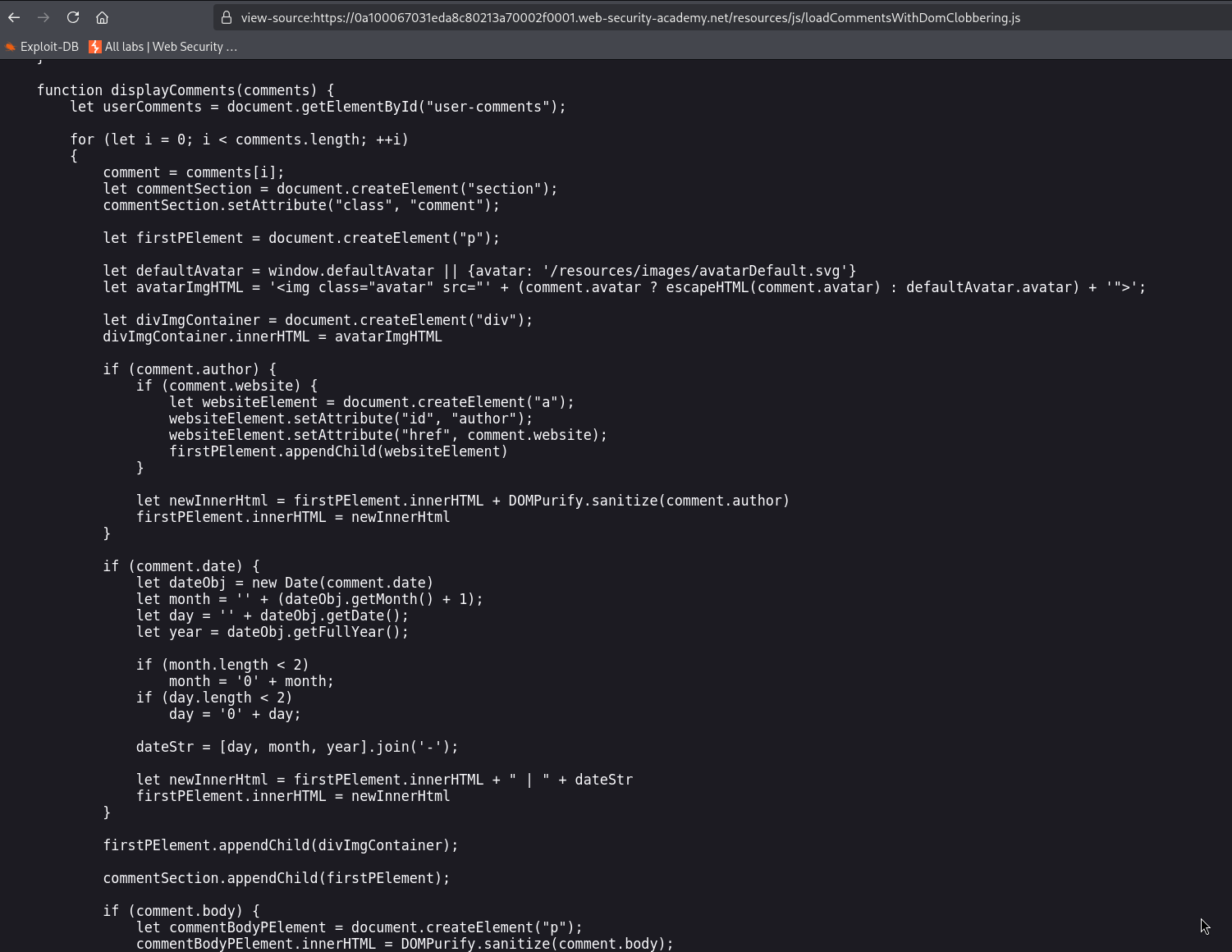
trimmed to what matters
let defaultAvatar = window.defaultAvatar || {avatar: '/resources/images/avatarDefault.svg'}
let avatarImgHTML = '<img class="avatar" src="' + (comment.avatar ? escapeHTML(comment.avatar) : defaultAvatar.avatar) + '">'
read it carefully, because the whole lab is in these two lines. the first says defaultAvatar is window.defaultAvatar if that global exists, otherwise a safe hardcoded object. normally window.defaultAvatar does not exist, so the safe default is used, but that || is trusting a global variable that we can create with dom clobbering. the second line builds an img tag, and for a comment that has no avatar of its own it uses defaultAvatar.avatar in the src, and crucially that value is dropped in without escaping, the escapeHTML call only runs on comment.avatar, never on the default. so if we can make window.defaultAvatar exist and control its avatar property, we control unescaped html inside that img src, and the result is written to the page with innerHTML
Step 2 - Clobber defaultAvatar with two anchors#
so we post a comment containing this html which the "safe" html filter allows because it is only anchors.
<a id=defaultAvatar><a id=defaultAvatar name=avatar href="cid:"onerror=alert(1)//">
here is how it clobbers the variable. both anchors have id=defaultAvatar so the browser groups them into a collection and makes window.defaultAvatar point at it, which satisfies the || and replaces the safe default with our elements. the second anchor also has name=avatar so defaultAvatar.avatar now resolves to that anchor and when the code puts defaultAvatar.avatar into the img src string, the anchor turns into its href value. we set that href to cid:"onerror=alert(1)//, where " is the html entity for a double quote, used so a real quote survives inside our comment and ends up in the href
Step 3 - Break out of the img src#
now follow what the img string becomes. the href decodes to cid:"onerror=alert(1)// and dropped into the template it gives this.
<img class="avatar" src="cid:"onerror=alert(1)//">
the double quote from our href closes the src attribute early, right after cid:, so onerror=alert(1) is read as a brand new attribute on the img, and the // comments out the leftover so nothing breaks. the src is now just cid:, which is not a real image, so the browser fails to load it and fires the onerror, calling alert(1)
Step 4 - Trigger a render and solve#
the clobbering anchors are planted by our first comment, but the alert only fires when a comment is rendered using that default avatar path with our anchors already in the page. so we return to the post and add a second comment with any random text, one that has no avatar of its own, and the next time the page loads its avatar img is built from our clobbered defaultAvatar.avatar and the alert goes off.

with this, the lab is solved!