
The lab
Here is how PortSwigger describes it
This lab contains a reflected XSS vulnerability in the search functionality but uses a web application firewall (WAF) to protect against common XSS vectors.
To solve the lab, perform a cross-site scripting attack that bypasses the WAF and calls the print() function.
The last few labs turned on quirks in how the page's own JavaScript handled our input, but this one is a plain reflected XSS with a guard standing in front of it, so the whole game becomes working out what that guard will actually let through.
The idea#
Before we touch the lab it helps to nail down four words, because the whole solve is really just juggling them.
A tag is a single HTML building block, like <img> or <body>. An attribute is a setting you put on a tag, written as name and value, like the src=1 inside <img src=1>. An event is simply a thing that happens to an element while the page is alive. The image finished loading is an event. The image failed to load is an event. The window changed size is an event. Someone clicked is an event. And an event handler is a special attribute whose name starts with on that says when this event happens, run this JavaScript. So onerror=print() means if this element errors, run print(), and onresize=print() means if this element gets resized, run print().
That is the engine behind almost every XSS payload. You smuggle in a tag that carries an event handler, the event fires, and your JavaScript runs. The usual go to is <img src=1 onerror=print()>, a broken image that errors on purpose so its onerror runs your code.
The wrinkle here is the WAF, a web application firewall. Think of it as a filter sitting in front of the site that reads every request and blocks anything matching its list of known bad patterns. It does not understand what we are trying to do, it just pattern matches, so <img> and onerror are almost certainly on its block list. That also means the way past it is not cleverness, it is patience. If we can find a tag it forgot to block and an event handler it forgot to block, and pair the two, we walk straight through. The rest of this lab is just finding that pair.
Step 1 - confirm the reflection and meet the WAF#
The vulnerability lives in the search box, so i started with the most ordinary payload there is
<img src=1 onerror=print()>
The response did not reflect it, it came back complaining that the tag is not allowed.
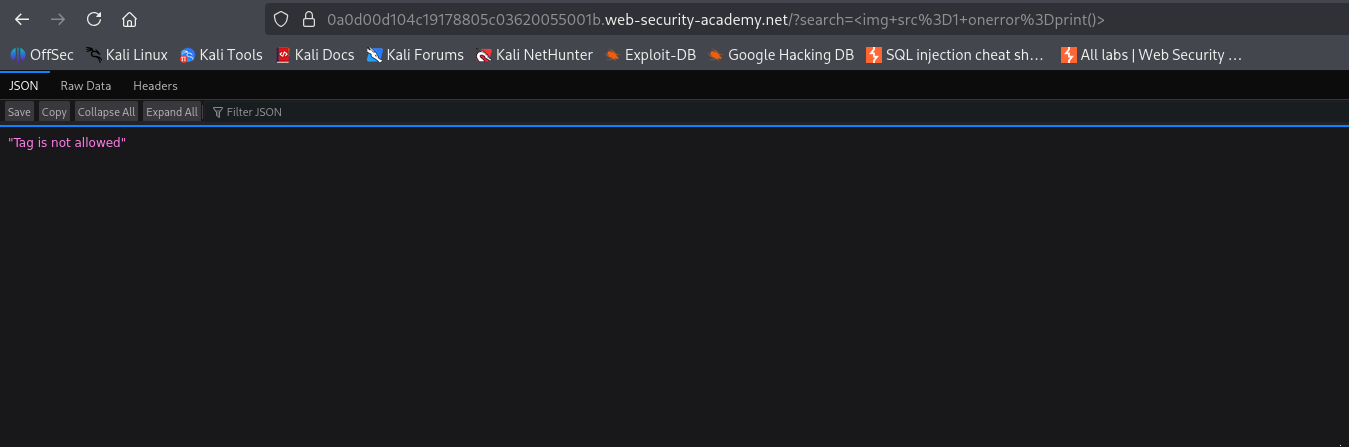
That single message tells us a lot. The input is reaching somewhere it would be dangerous, otherwise the WAF would not care, and the WAF is watching the tags we send by name. So the next job is not to be clever with img, it is to find out which tags the filter has actually blocked and which ones slipped its mind.
Step 2 - brute force the allowed tags with Burp Intruder#
Testing tags one by one would take forever, so this is where Burp Intruder earns its place. Intruder takes one request and fires it over and over, dropping a different value from a list into the same spot each time, then shows you the response for every attempt so you can see which ones behaved differently.
I sent the search request over to Intruder and set the search term to an empty tag.
<>
Then I marked an insertion point between the angle brackets, so every payload from my list gets dropped right where a tag name would sit.
For the list itself, PortSwigger keeps a brilliant cheat sheet with a copy tags to clipboard button that hands you every tag worth trying.
Paste those tags into the payloads box, run the attack, and read the status codes. blocked tag comes back as a 400, an allowed one comes back as a 200, so you are really just scanning for the odd ones out.
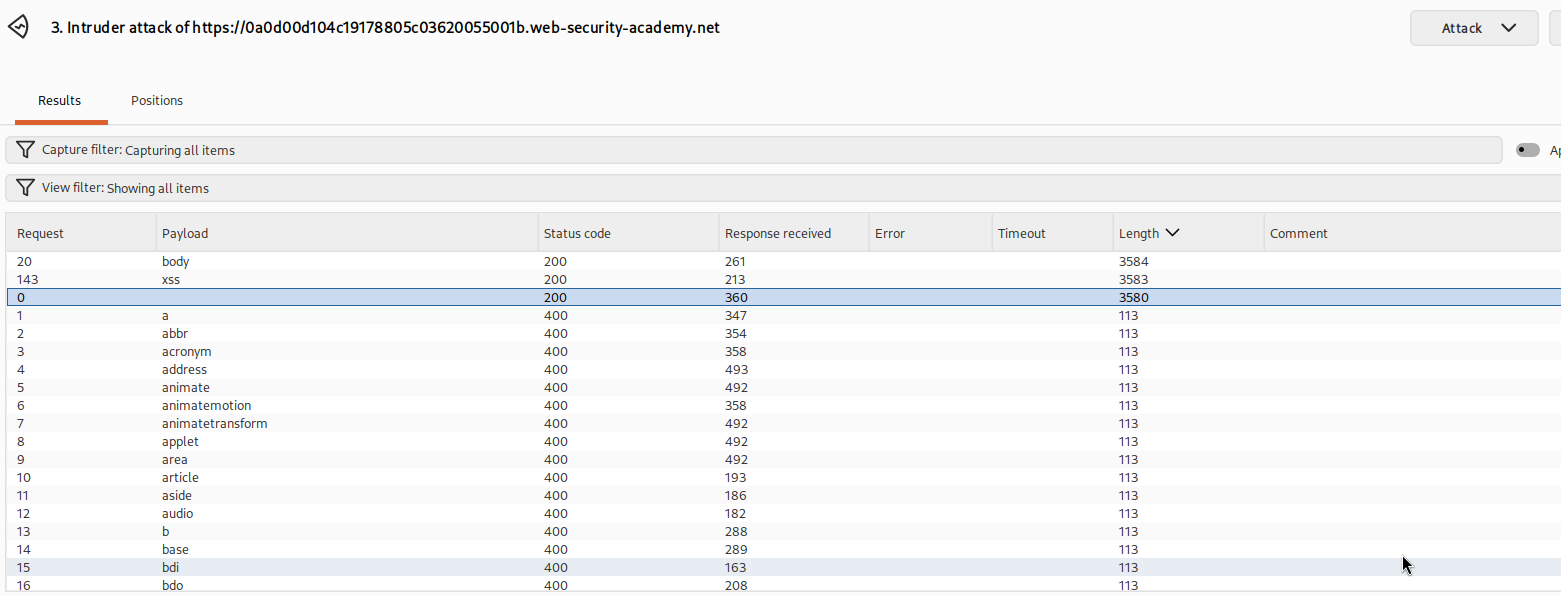
Two tags came back allowed, body and xss. We will go with body, because it is a real tag that can hold an event handler and, very conveniently, it reacts to the page being resized. Keep that last part in mind, it decides everything later.
Step 3 - brute force the allowed events#
Having an allowed tag is only half a payload. A tag with no event handler just sits there. So we repeat the exact same trick, except this time we hunt for an event handler the WAF forgot about.
Back in Intruder, I changed the search value to a body tag with a spare attribute slot and put the insertion point where the event handler name goes.
<body%20=1>
The %20 is just a URL encoded space, the gap between the tag name and the attribute. The insertion point sits right before the =, so each payload becomes a candidate event name like onload, onclick, onresize and so on. PortSwigger's cheat sheet has a copy events to clipboard button for exactly this
Run the attack and read the results the same way.
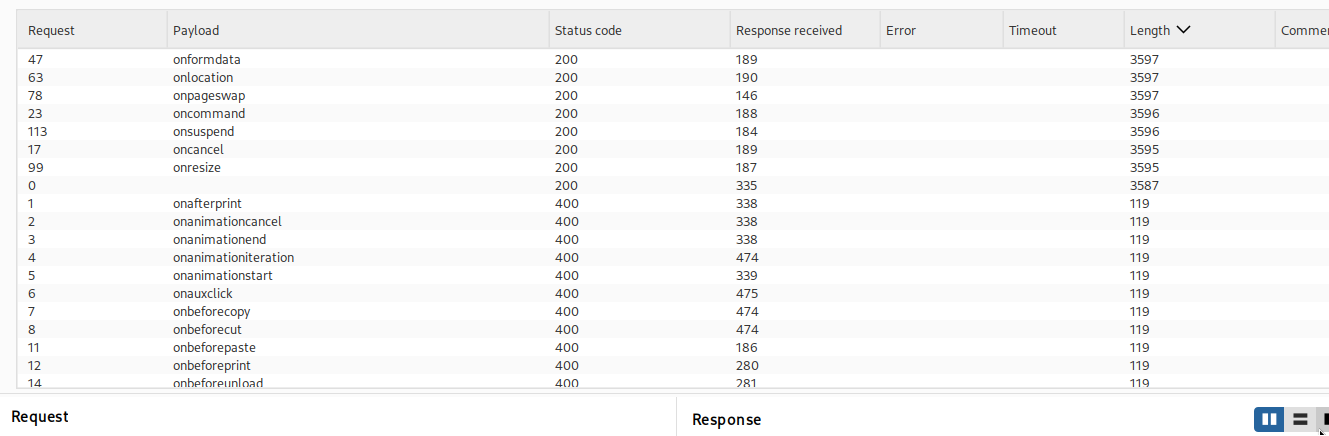
Almost everything came back as a 400, but one event slipped through with a 200, onresize. So now we have our pair. The tag is body and the event is onresize, and together they spell <body onresize=print()>, which reads as when this body gets resized, run print.
Step 4 - build the exploit and deliver it#
There is one catch with onresize. It only fires when something actually changes size, and a page a victim opens normally does not resize itself. If we just send the victim our search link, our body tag lands on the page but nothing ever resizes it, so print() never runs. We need to force a resize for them.
The clean way is an iframe. An iframe is a small window that loads another page inside your page. The plan is to host a page on the exploit server that loads the vulnerable search page inside an iframe, and the instant that iframe finishes loading we shrink its width. Changing the iframe's width resizes the page sitting inside it, that resize fires our body's onresize, and print() runs. All the victim has to do is open our page and the whole chain happens on its own.
Here is the code to drop on the exploit server.
<iframe src="https://YOUR-LAB-ID.web-security-academy.net/?search=%22%3E%3Cbody%20onresize=print()%3E" onload=this.style.width='100px'>
Two pieces are doing the work. The search value is URL encoded, and decoded it reads "><body onresize=print()>. That leading "> closes out of whatever tag and attribute our search term was reflected inside, which frees us to open a brand new tag right after it, our <body onresize=print()>. The second piece is onload=this.style.width='100px' on the iframe itself, which fires once the framed page has loaded and sets its width to 100 pixels, and that size change is the resize that sets everything off.
Swap in your own lab id, deliver it to the victim, and the framed page resizes, the body's onresize runs, and print fires in their browser.
With this, the lab is solved!