
The lab
Here is how PortSwigger describes it
This lab contains a DOM-based cross-site scripting vulnerability in a AngularJS expression within the search functionality. AngularJS is a popular JavaScript library, which scans the contents of HTML nodes containing the ng-app attribute (also known as an AngularJS directive). When a directive is added to the HTML code, you can execute JavaScript expressions within double curly braces. This technique is useful when angle brackets are being encoded. To solve this lab, perform a cross-site scripting attack that executes an AngularJS expression and calls the alert function.
The idea#
Most reflected XSS leans on you getting characters like <, > and " into the page so you can either open a fresh tag or break out of an existing attribute. Take those away by HTML encoding them and the classic payloads fall flat, because the browser just prints them back as text instead of acting on them.
AngularJS changes the maths. When a page hands part of itself over to Angular, anything inside double curly braces {{ }} stops being plain text and turns into an expression that Angular evaluates for you. So if our input lands inside an Angular controlled region, we do not need angle brackets at all. We write an expression that runs code, and Angular happily runs it. That is the door this lab wants us to walk through.
Step 1 - find where the search term lands#
Same as always, the first move is to feed the search box something recognisable and then go looking for where it comes back. I dropped logicbreaker into the search and opened up the page source.
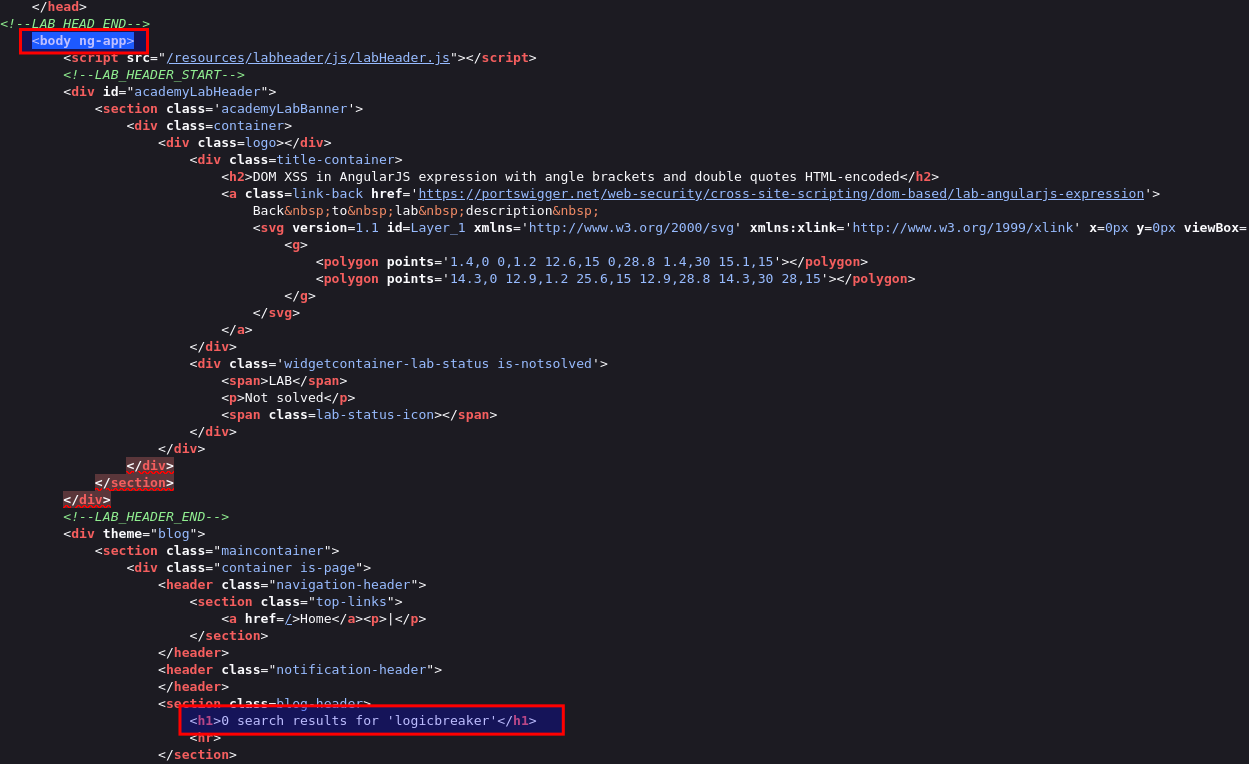
There it is, sitting inside an element that carries the ng-app attribute.
Quick word on ng-app because it is the whole reason any of this works. ng-app is how AngularJS marks its territory. it tells Angular start here, this chunk of the page is mine to look after. everything inside that element gets scanned by Angular, and any {{ }} it spots gets treated as an expression to evaluate rather than text to print our search term is landing right inside that region, which means an expression we type will actually get run.
Step 2 - see why the usual payloads are dead#
Before reaching for Angular it is worth confirming why we cannot just do the normal thing. If you feed in something like <script> or try to break out with a ", the response comes back with those characters HTML encoded. The angle brackets and the double quote all get swapped for their harmless encoded versions, so the browser just draws them as literal text and nothing fires. No new tag, no attribute break out, nothing.
That is exactly the constraint the lab title is warning us about. Angle brackets and double quotes are off the table. But look at what is not encoded. Curly braces come through untouched, and so do single quotes. That is all AngularJS needs from us.
Step 3 - fire the AngularJS expression and solve#
Since our text lands inside the ng-app region, we can hand Angular an expression instead of markup. drop this into the search box
{{$on.constructor('alert(1)')()}}
Here is what is going on$on is just a function that Angular already makes available to us on the scope. We do not care what it normally does, we only want it because every function in JavaScript carries a .constructor, and the constructor of a function is the built in Function builder. So $on.constructor hands us Function. Feeding it the string 'alert(1)' builds a brand new function whose body is alert(1), and the trailing () runs that function on the spot.
The neat part is that we never needed a single angle bracket or double quote. The whole thing lives inside {{ }}, and we used single quotes around alert(1) on purpose, because double quotes would have been encoded. We stayed entirely inside Angular's expression world, which is the one part of the page the filter was not watching.
Hit search and the expression evaluates.
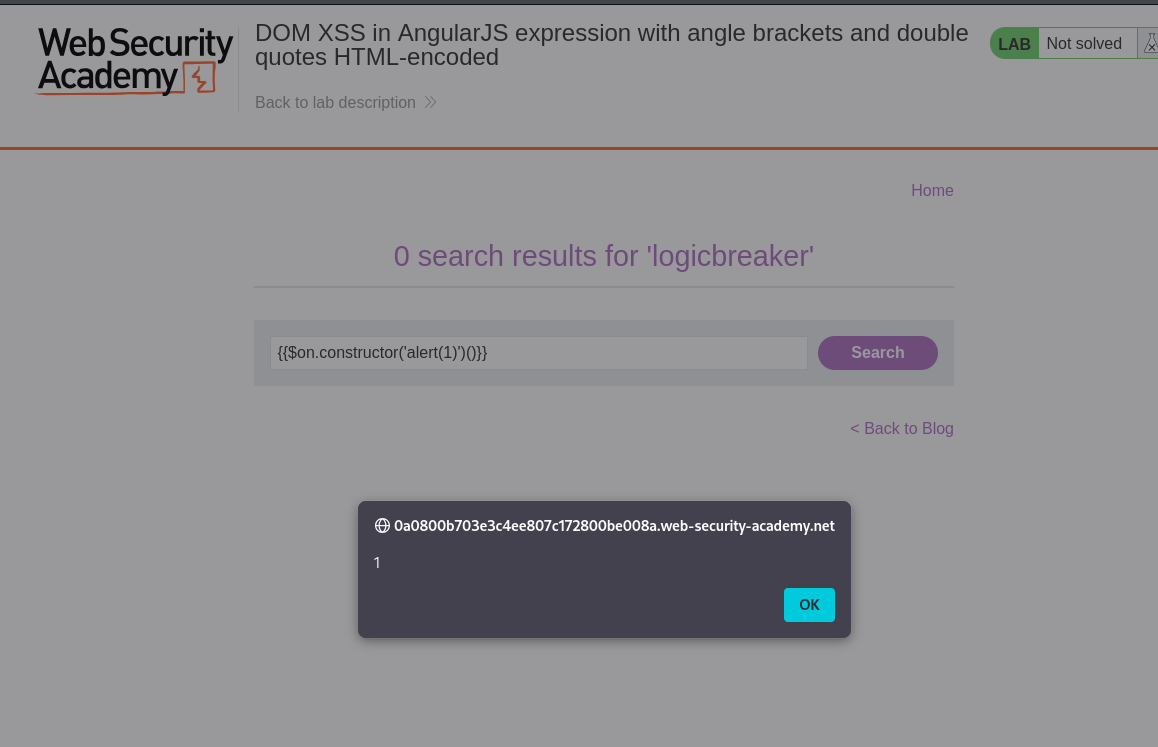
With this, the lab is solved!