
The lab
Here is how PortSwigger describes it
This lab demonstrates a reflected DOM vulnerability. Reflected DOM vulnerabilities occur when the server-side application processes data from a request and echoes the data in the response. A script on the page then processes the reflected data in an unsafe way, ultimately writing it to a dangerous sink.
To solve this lab, create an injection that calls the alert() function.
The idea#
Reflected DOM XSS sits halfway between the two things you already know. In plain reflected XSS the server takes your input and writes it straight into the HTML, so the server is the one handing the browser a live payload. In pure DOM XSS the data never leaves the browser at all, a script reads it from something like the URL and drops it into a sink.
Reflected DOM is the mix of both. Your input goes to the server, the server echoes it back inside a response, and then a script running on the page picks that response up and does something unsafe with it. So the source is the reflected data coming back from the server, and the sink is whatever dangerous function the client side script feeds it into. Here that sink turns out to be eval, which is about as dangerous as sinks get, because anything you slip into it runs as real JavaScript.
Step 1 - map the search and catch the request#
The home page has the usual search box, and there is a comment section under the posts too, so both are worth keeping in mind. I fired up Burp so it could passively log everything while I poked around, then searched for logicbreaker
The request that went out was the interesting part. It landed on
/search-results?search=logicbreaker
and the response was not HTML this time, it came back as JSON.
{"results":[],"searchTerm":"logicbreaker"}
Our search term is echoed straight back inside that searchTerm field. That is the reflection. The next question is who reads this JSON and what they do with it.
Step 2 - find the sink#
Looking at the page source, there is a script being pulled in.
<script src='/resources/js/searchResults.js'></script>
So i opened searchResults.js to see how the JSON gets handled, and this is the line that matters. A small XHR handler waits for the search response to come back and then runs this on it.
eval('var searchResultsObj = ' + this.responseText)
And there it is. The script does not parse the JSON safely, it glues the literal text var searchResultsObj = onto the front of the raw response and hands the whole thing to eval. eval runs whatever you give it as JavaScript, so the entire response is being treated as code rather than data. If we can shape that JSON so part of it reads as our own code, eval will run it for us.
Step 3 - break out of the JSON string and land the alert#
Our input sits inside a double quoted string in the JSON, the searchTerm value. To turn it into code we need to close that string early and then write something that runs.
There is a catch though. When you send a plain ", the server escapes it to \" so the JSON stays valid, which means a bare quote never actually closes the string. So I ran a few test cases to see exactly what the server escapes and what it leaves alone.
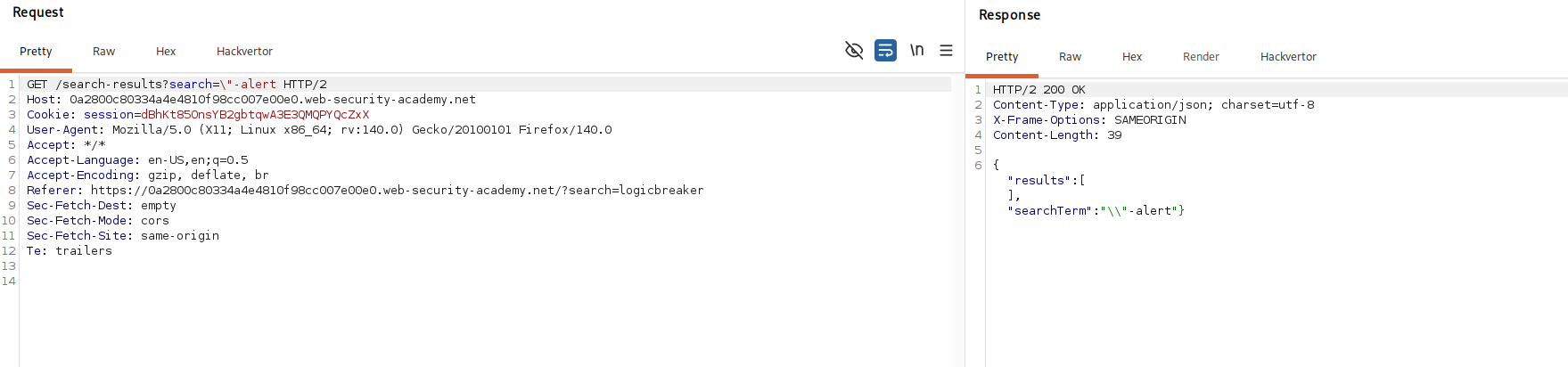
The useful discovery is that the server escapes our quote but passes our own backslash straight through. So we hand it a backslash of our own right before the quote. Here is the payload that works.
\"-alert(1)}//
Now walk through what eval ends up seeing. The server takes our " and escapes it to \", but our leading \ goes through untouched, so the reflected value starts with \\". The response becomes this.
{"results":[],"searchTerm":"\\"-alert(1)}//"}
Read that the way eval does, as Javascript. The pair \\ is an escaped backslash, so it is just one real backslash sitting inside the string, and the " right after it closes the string for good. In other words "\\" is a finished string that holds a single backslash. The moment that string closes, we are standing in code, not in text.
What comes next is -alert(1). Because the string value is now followed by a minus, JavaScript has to work out "\\" - alert(1) as an expression, and to do that it has no choice but to call alert(1). That is our payload firing. The } right after closes the object so the shape stays valid, and the // comments out the leftover "} from the original JSON so nothing trailing throws a syntax error.
So the line eval runs boils down to building an object whose searchTerm is the value of "\\" - alert(1), and working that value out is what pops the box.
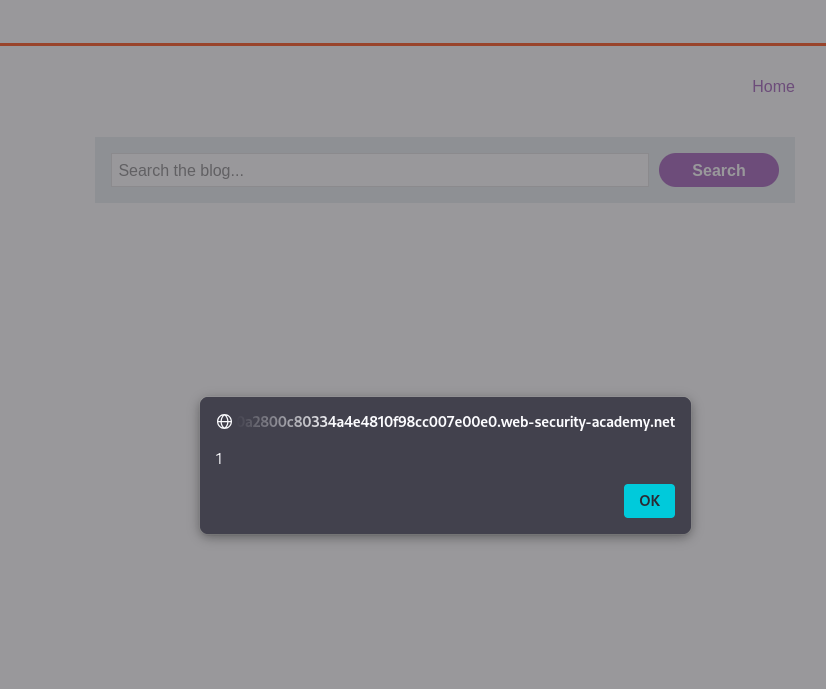
With this, the lab is solved!